
Sinch Engage (2.1.0)
Download OpenAPI specification:Download OpenAPI (YAML)Download OpenAPI (JSON)
The Sinch APIs provide powerful business messaging capabilities across sending, receiving, and processing SMS, MMS, and rich messaging.
All requests to the Sinch REST API must be authenticated, this can either be done using Basic Authentication or by signing with a HMAC signature.
The API uses the following base URI
For EU instance please use https://eu.app.api.sinch.com
For APAC instance, use https://au.app.api.sinch.com
To access the API, an API key and secret are required.
De-Duplication
De-Duplication helps you avoid having to undertake data cleansing before commencing send outs.
It automatically detects and withholds messages deemed to be duplicates through the use of a 24-hour window – if a message is sent to the same number with the same content within a 24hr period, the subsequent message(s) will be withheld and rejected. To enable this, you don't need to make any changes to your application, just an account configuration change by Sinch's support team.
Social Sending
Social Sending permits messages to be sent only during sociable hours - i.e. 8am to 6pm (based on your accounts local time zone - not local time). Messages sent outside of these hours are scheduled to be released during the next social time period. This feature helps businesses avoid send-outs during a time that would be deemed unsuitable by the customer. To enable this, you don't need to make any changes to your application, just an account configuration change by Sinch's support team.
Familiar Sender
Familiar Sender ensures all communication sent to a customer are from the same phone number. This allows businesses to build trust and familiarity with their customers and not confuse them by changing outgoing numbers. To enable this, you don't need to make any changes to your application, just an account configuration change by Sinch's support team.
Character Converter
Characters in a message may not always fall within the GSM-7 supported character set, and when this occurs all outbound messages will be encoded using UCS-2 leading to the customer being double-charged for the SMS. Character Converter can help you avoid being double-charged for your SMS by converting all characters into the GSM-7 format ensuring you always get the maximum characters into an SMS. Bear in mind, this will downgrade all your unicode characters so for instance, your emojis will be translated into a string of unknown characters (eg: �). To enable this, you don't need to make any changes to your application, just an account configuration change by Sinch's support team.
Every request requires an Authorization header in the following format:
Authorization: Basic Base64(api_key:api_secret)
Where the header consists of the Basic keyword followed by your Basic Authentication api_key and api_secret that you have been supplied by support, separated with a colon (:) which is then Base64 encoded.
Example request with Basic Authentication
POST /v1/messages HTTP/1.1
Host: eu.app.api.sinch.com
Accept: application/json
Content-Type: application/json
Authorization: Basic dGhpc2lzYWtleTp0aGlzaXNhc2VjcmV0Zm9ybW1iYXNpY2F1dGhyZXN0YXBp
{
  "messages": [
    {
      "content": "Hello World",
      "destination_number": "+61491570156",
      "format": "SMS"
    }
  ]
}
Note: spaces are used as indentation in the body of the above request.
Every request requires an Authorization header in the following formats:
For a request with a request body:
Authorization: hmac username="<API KEY>", algorithm="hmac-sha256", headers ="Date Content-MD5 request-line", signature="<SIGNATURE>"
For a request without a request body:
Authorization: hmac username="<API KEY>", algorithm="hmac-sha256", headers="Date request-line", signature="<SIGNATURE>"
To create this header
Step 1
Add a Date header to the request using the current date time in RFC7231 Section 7.1.1.2 format
Step 2
If the request has a body, add a header called Content-MD5 where the value of this header is an MD5 hash of the request body, otherwise this header is not required
Step 3
Create a signing string by concatenating the Date header, the
Content-MD5 header (if set) and the request line with line breaks:
Date: Sat, 30 Jul 2016 05:13:23 GMT\nContent-MD5: 10fd4feab20d38432480c07301e49616\nPOST /v1/messages HTTP/1.1
or
Date: Sat, 30 Jul 2016 05:13:23 GMT\nGET /v1/messages/404b941b-2a29-469f-b114-9ea3e16bbe18 HTTP/1.1
Step 4
Create a SHA256 HMAC hash using the signing string and the secret key (both converted to bytes using UTF-8) HMAC-SHA256(signing string, secret)
Step 5
Base64 encode the HMAC hash and include it as the signature in the Authorization header
Example request with body
POST /v1/messages HTTP/1.1
Host: eu.app.api.sinch.com
Accept: application/json
Content-Type: application/json
Date: Sat, 30 Jul 2016 05:18:52 GMT
Authorization: hmac username="uCXUdoogNfCsehEClbO2", algorithm="hmac-sha256", headers="Date Content-MD5 request-line", signature="Ia4G5lkhH/3NDYpix+8ZHUnp6bA="
Content-MD5: 5407644fa83bec240dede971307e0cad
Content-Length: 133
{
  "messages": [
    {
      "content": "Hello World",
      "destination_number": "+61491570156",
    "format": "SMS"
    }
  ]
}
Note: spaces are used as indentation in the body of the above request.
Example request without body
GET /v1/messages/404b941b-2a29-469f-b114-9ea3e16bbe18 HTTP/1.1
Host: eu.app.api.sinch.com
Accept: application/json
Date: Sat, 30 Jul 2016 05:18:52 GMT
Authorization: hmac username="uCXUdoogNfCsehEClbO2", algorithm="hmac-sha256", headers="Date request-line", signature="NTUwMjUwNTVmZGYzZTIxODMyYjc1ZmM3M2EwZWQ1NzA3NzA4ZTZjNw==" ```
Using API keys at the parent account level, you can perform actions on behalf of a sub-account.
This feature is supported by the Messages, Replies, Delivery Reports and Webhooks APIs.
To do this
include a header key Account with the sub-account ID as the value. For example:
Account: mySubAccount
Example request with Sending from sub-accounts
POST /v1/messages HTTP/1.1
Host: eu.app.api.sinch.com
Accept: application/json
Content-Type: application/json
Authorization: Basic dGhpc2lzYWtleTp0aGlzaXNhc2VjcmV0Zm9ybW1iYXNpY2F1dGhyZXN0YXBp
Account: SubAccount
{
  "messages": [
    {
      "content": "Hello World",
      "destination_number": "+61491570156",
      "delivery_report": true
    }
  ]
}
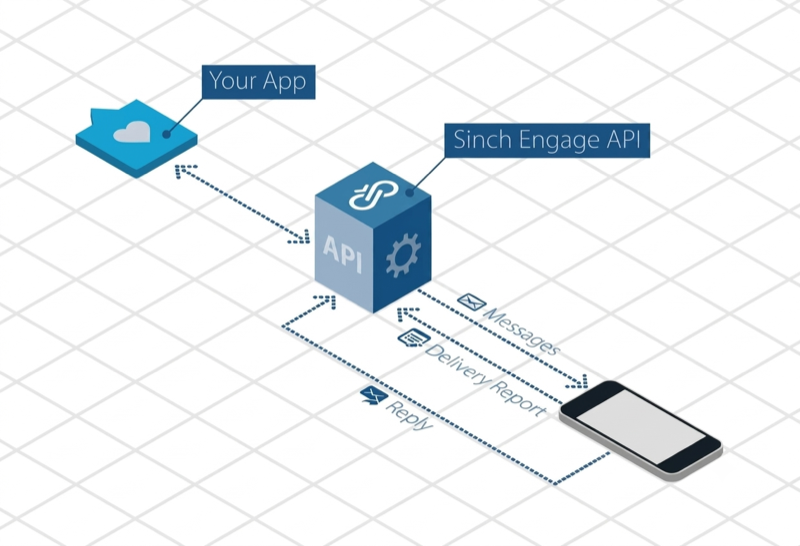
The Sinch Messages API provides a number of endpoints for building powerful two-way messaging applications. The Messages API provides access to three main resources:
- Messages - Messages delivered from an application to a handset.
- Delivery Reports - Real time reports on the delivery status of a message. As a message is processed, it's status may change several times before it is finally delivered to a handset.
- Replies - Messages sent from a handset to an application. These messages are typically a reply to a previously sent message.
Get message status
Retrieve the current status of a message using the message ID returned in the send messages endpoint.
A successful request to the get message status endpoint will return a response body as follows:
{
    "format": "SMS",
    "content": "My first message!",
    "metadata": {
        "key1": "value1",
        "key2": "value2"
    },
    "message_id": "877c19ef-fa2e-4cec-827a-e1df9b5509f7",
    "callback_url": "https://my.callback.url.com",
    "delivery_report": true,
    "destination_number": "+61401760575",
    "scheduled": "2016-11-03T11:49:02.807Z",
    "source_number": "+61491570157",
    "source_number_type": "INTERNATIONAL",
    "message_expiry_timestamp": "2016-11-03T11:49:02.807Z",
    "status": "enroute"
}
The status property of the response indicates the current status of the message. See the Delivery Reports section of this documentation for more information on message statuses. The expiry date for getting an entity is 45 days.
Note: If an invalid or nonexistent message ID parameter is specified in the request, then a HTTP 404 Not Found response will be returned
Authorizations:
path Parameters
| messageId required | string Example: 389dc1a8-62a4-4110-ba61-af94806c006f 36 character UUID. |
Responses
Request samples
- C#
- Java
- JavaScript
- PHP
- Python
string messageId = "messageId2";

try
{
    GetMessageStatusResponse result = messages.GetMessageStatusAsync(messageId).Result;
}
catch (APIException e){};
Response samples
- 200
- 401
- 404
{- "content": "Hello world!",
- "destination_number": "+61491570156",
- "delivery_report": false,
- "format": "SMS",
- "message_expiry_timestamp": "11/3/2016 11:49:02 AM",
- "metadata": { },
- "scheduled": "11/3/2016 11:49:02 AM",
- "source_number": "+61491570156",
- "source_number_type": "INTERNATIONAL",
- "message_id": "d7d9d9fd-478f-40e6-b651-49b7f19878a2",
- "status": "enroute"
}Cancel scheduled message
Cancel a scheduled message that has not yet been delivered.
A scheduled message can be cancelled by updating the status of a message
from scheduled to cancelled. This is done by submitting a PUT request to the
messages endpoint using the message ID as a parameter (the same endpoint used above to retrieve
the status of a message). The expiry date for getting an entity is 45 days.
The body of the request simply needs to contain a status property with the value set to cancelled.
{
    "status": "cancelled"
}
Note: Only messages with a status of scheduled can be cancelled. If an invalid or nonexistent message ID parameter is specified in the request, then a HTTP 404 Not Found response will be returned
Authorizations:
path Parameters
| messageId required | string Example: 389dc1a8-62a4-4110-ba61-af94806c006f 36 character UUID. |
Request Body schema: application/jsonrequired
Parameters of a message to change.
| status required | string Must be set to |
Responses
Request samples
- Payload
- C#
- Java
- JavaScript
- PHP
- Python
{- "status": "cancelled"
}Response samples
- 400
- 401
- 404
{- "message": "Request failed to parse correctly. Please ensure input is valid and try again.",
- "details": [
- "Failed to parse message body."
]
}Send messages
Submit one or more (up to 100 per request) SMS, MMS or text to voice messages for delivery.
The most basic message has the following structure:
{
    "messages": [
        {
            "content": "My first message!",
            "destination_number": "+61491570156"
        }
    ]
}
More advanced delivery features can be specified by setting the following properties in a message:
callback_urlA URL can be included with each message to which
Webhooks will be pushed to via a HTTP POST request. Webhooks will be sent if and when the status of the message changes as it is processed (if the delivery report property of the request is set to true) and when replies are received. Specifying a callback URL is optional.
contentThe content of the message. This can be a Unicode string, up to 5,000 characters long. Message content is required.delivery_reportDelivery reports can be requested with each
message. If delivery reports are requested, a webhook will be submitted to the callback_url property specified for the message (or to the webhooks)
specified for the account every time the status of the message changes as it is processed. The
current status of the message can also be retrieved via the Delivery Reports endpoint of the
Messages API. Delivery reports are optional and by default will not be requested.
destination_numberThe destination number the message should be
delivered to. This should be specified in E.164
international format. For information on E.164, please refer to http://en.wikipedia.org/wiki/E.164.
A destination number is required.
⚠️ IMDA TLS Compliance Notice: From 1 April 2026, all requests sending messages to Singapore (+65) numbers must use TLS 1.3 or higher. Requests using an older TLS version will be rejected with HTTP 422 Unprocessable Entity.
formatThe format specifies which format the message will be
sent as, SMS (text message), MMS (multimedia message)
or TTS (text to speech). With TTS format, we will call the destination number and read out the
message using a computer generated voice. Specifying a format is optional, by default SMS will be used.
source_number_typeIf a source number is specified, the type of
source number may also be
specified. This is recommended when using a source address type that is not an internationally
formatted number, available options are INTERNATIONAL, ALPHANUMERIC or SHORTCODE. Specifying a
source number type is only valid when the source_number parameter is specified and is optional.
If a source number is specified and no source number type is specified, the source number type will be
inferred from the source number, however this may be inaccurate.
source_number[optional] Specify a source number to be used. Refer to the section below for more information on source numbers.
⚠️ The number or sender ID must be registered to your account (from 1-Mar-2024).
Source number (sender ID)
There are several options for the number or sender ID that will show as the source of an outbound message. Some things to note:
- If you do not specify a source number, the message will be sent with the default number for your account.
- The default may be a number you have purchased from us - such as a dedicated number, a 10-digit longcode or toll-free number (US/CA), or a shortcode. Log into the web portal to manage your numbers.
- If your account has multiple numbers, you can specify which source number to use in the request.
- If your account does not have a number, your message may be sent using our shared number pool (in certain countries only)
- Alpha tag: In some countries (AU, GB, some others), you may be able to send using an alpha tag - text that represents your brand of business. Before using an alpha tag, you must register it in the Numbers section of the web portal.
- Other numbers: You may use numbers that you own as the source number, but you must register them in the Numbers section of the web portal to confirm you have a right to use the number.
If you need to register a large number of source numbers/sender IDs, consider using our Source Address API
⚠️ If you specify a source_number that is not registered to your account, the message may fail to send, or may be sent with an alternative number.
mediaThe media is used to specify a list of URLs of the media file(s) that you are trying to send.
Supported file formats include png, jpeg and gif. format parameter must be set to MMS for this to
work.
subjectThe subject field is used to denote subject of the MMS
message and has a maximum size of 64 characters long. Specifying a subject is optional.
scheduledA message can be scheduled for delivery in the future
by setting the scheduled property. The scheduled property expects a date time specified in ISO 8601 format. The scheduled time must be provided in UTC and is optional. If no scheduled property is set, the message will be delivered immediately.
message_expiry_timestampA message expiry timestamp can be
provided to specify the latest time at which the message should be delivered. If the message cannot be delivered before the specified message expiry timestamp elapses, the message will be discarded. Specifying a message expiry timestamp is optional.
metadataMetadata can be included with the message which will
then be included with any delivery reports or replies matched to the message. This can be used to create powerful two-way messaging applications without having to store persistent data in the application. Up to 10 key / value metadata data pairs can be specified in a message. Each key can be up to 100 characters long, and each value up to 256 characters long. Specifying metadata for a message is optional.
The response body of a successful POST request to the messages endpoint
will include a messages property which contains a list of all messages submitted. The list of
messages submitted will reflect the list of messages included in the request, but each message
will also contain two new properties, message_id and status. The returned message ID
will be a 36 character UUID which can be used to check the status of the message via the Get Message
Status endpoint. The status of the message which reflect the status of the message at submission
time which will always be queued. See the Delivery Reports section of this documentation for
more information on message statuses.
Note: when sending multiple messages in a request, all messages must be valid for the request to be successful. If any messages in the request are invalid, no messages will be sent.
Authorizations:
Request Body schema: application/jsonrequired
Request body.
required | Array of objects (Message) List of messages. |
Responses
Request samples
- Payload
- C#
- Java
- JavaScript
- PHP
- Python
{- "messages": [
- {
- "content": "My first message",
- "destination_number": "+61491570156",
- "delivery_report": true,
- "format": "SMS",
- "message_expiry_timestamp": "2016-11-03T11:49:02.807Z",
- "metadata": {
- "key1": "value1",
- "key2": "value2"
}, - "scheduled": "2016-11-03T11:49:02.807Z",
- "source_number": "+61491570157",
- "source_number_type": "INTERNATIONAL"
}, - {
- "content": "My second message",
- "destination_number": "+61491570158",
- "delivery_report": true,
- "format": "MMS",
- "subject": "This is an MMS message",
- "message_expiry_timestamp": "2016-11-03T11:49:02.807Z",
- "metadata": {
- "key1": "value1",
- "key2": "value2"
}, - "scheduled": "2016-11-03T11:49:02.807Z",
- "source_number": "+61491570159",
- "source_number_type": "INTERNATIONAL"
}
]
}
Response samples
- 202
- 400
- 401
{- "messages": [
- {
- "content": "Hello world!",
- "destination_number": "+61491570156",
- "delivery_report": false,
- "format": "SMS",
- "message_expiry_timestamp": "11/3/2016 11:49:02 AM",
- "metadata": [
- {
- "myKey": "myValue"
}, - {
- "anotherKey": "anotherValue"
}
], - "scheduled": "11/3/2016 11:49:02 AM",
- "source_number": "+61491570156",
- "source_number_type": "INTERNATIONAL",
- "message_id": "d7d9d9fd-478f-40e6-b651-49b7f19878a2",
- "status": "enroute",
- "subject": "New Products"
}
]
}If a callback URL is specified in the submit message request, then changes to the message status, replies received in response to the message or delivery reports received for the message will be pushed via a HTTP POST request. An alternative to delivery reports via a callback URL is custom webhooks using the webhooks management API.
All notifications are JSON encoded and the request expects to receive a response in the HTTP 200 range. If a valid response isn't received the request will be retried in an exponentially backing off fashion.
Delivery Reports may carry an additional charge. For pricing, please contact your Account Manager or Support Team (support@app.sinch.com).
To include billing units in your delivery receipts via Webhooks, ensure that the switch "Enable billing units in Delivery Reports and Callbacks" is enabled in the API settings of your account.
For delivery reports or changes in the status of a message, the POST request to the specified URL will be as follows:
Note, multiple delivery report notifications will be received for a single message.
{
  "callback_url":"http://mockbin.org/bin/ac52ebd4-eca1-4c86-bf38-4dce79633906",
  "delivery_report_id":"693e87f2-a553-4281-9ffe-ddf04cbc4bf3",
  "source_number":"+61491570156",
  "date_received":"2016-11-03T11:49:02.807Z",
  "status":"delivered",
  "delay":0,
  "billing_units":1,
  "submitted_date":"2016-11-03T11:49:01.551Z",
  "original_text":"Hello world!",
  "message_id":"389dc1a8-62a4-4110-ba61-af94806c006f",
  "vendor_account_id":{
    "vendor_id":"SinchEU",
    "account_id":"MyAccount"
  },
  "error_code":"220",
  "metadata":{
    "key":"value"
  }
}
The properties included in the notification are as follows:
Callback URL: The URL specified as the callback URL in the original submit message request.
Delivery Report ID: A unique ID for the delivery report that this notification represents.
Source Number: The destination address of the original message.
Date Received: The date and time at which this notification was generated in UTC.
Status: The status of the message as indicated by this delivery report. The status field can be one of the following values:
enroute: Message has been received by the gateway and is being processed (or waiting to be processed).submitted: Message has been submitted to a provider/carrier for delivery.delivered: Message delivery has been confirmed by the provider, including to the handset (where possible).expired: The message has expired.rejected: The message will not be delivered - permanent failure. Reasons may include usage limit exceeded, insufficient credit, number blocked, or content filteredfailed: The message has failed. Reasons may include no active routes to destination or undeliverable by downstream provider.
Delay: Deprecated, no longer in use
Billing Units: The number of billing units charged for the message.
Submitted Date: Date time status of the message changed in UTC. For a delivered DR this may indicate the time at which the message was received on the handset.
Original Text: Text of the original message.
Message ID: ID of the original message.
Vendor Account ID: The account used to submit the original message. The vendor will always be
SinchEUError Code: A status code which provides additional information about the message status:
101: Message being processed by the gateway.102: Message is being rerouted to a different provider after failing via the first provider.151: Message held for screening.200: Message submitted to downstream provider for delivery.210: Message accepted by downstream provider.211: Message is enroute for delivery by provider.212: Message submitted. Delivery pending.213: Message scheduled for delivery by downstream provider.220: Message delivered.221: Message delivered to the handset.320: Message validity period has expired (prior to submission).401: Message validity period has expired (before delivery).301: Usage threshold reached. Message discarded.302: Destination address blocked. Message discarded.303: Source address blocked. Message discarded.304: Message dropped. Contact support.305: Message discarded due to duplicate detection.402: Message rejected by downstream provider.403: Message skipped by downstream provider.410: Invalid source address.411: Invalid destination address.412: Destination address blocked.413: SMS service unavailable on destination.414: Destination unreachable.330: Gateway failure.331: Message discarded.332: No available route to destination.333: Source address unsupported for this destination.400: Message failed; undeliverable.405: Message cancelled or deleted by provider.
Check delivery reports
Check for any delivery reports that have been received. Delivery reports are a notification of the change in status of a message as it is being processed. Each request to the check delivery reports endpoint will return any delivery reports received that have not yet been confirmed using the confirm delivery reports endpoint. A response from the check delivery reports endpoint will have the following structure:
{
    "delivery_reports": [
        {
            "callback_url": "https://my.callback.url.com",
            "delivery_report_id": "01e1fa0a-6e27-4945-9cdb-18644b4de043",
            "source_number": "+61491570157",
            "date_received": "2017-05-20T06:30:37.642Z",
            "status": "enroute",
            "delay": 0,
            "billing_units": 1,
            "submitted_date": "2017-05-20T06:30:37.639Z",
            "original_text": "My first message!",
            "message_id": "d781dcab-d9d8-4fb2-9e03-872f07ae94ba",
            "vendor_account_id": {
                "vendor_id": "SinchEU",
                "account_id": "MyAccount"
            },
            "metadata": {
                "key1": "value1",
                "key2": "value2"
            }
        },
        {
            "callback_url": "https://my.callback.url.com",
            "delivery_report_id": "0edf9022-7ccc-43e6-acab-480e93e98c1b",
            "source_number": "+61491570158",
            "date_received": "2017-05-21T01:46:42.579Z",
            "status": "enroute",
            "delay": 0,
            "billing_units": 1,
            "submitted_date": "2017-05-21T01:46:42.574Z",
            "original_text": "My second message!",
            "message_id": "fbb3b3f5-b702-4d8b-ab44-65b2ee39a281",
            "vendor_account_id": {
                "vendor_id": "SinchEU",
                "account_id": "MyAccount"
            },
            "metadata": {
                "key1": "value1",
                "key2": "value2"
            }
        }
    ]
}
Each delivery report will contain details about the message, including any metadata specified and the new status of the message (as each delivery report indicates a change in status of a message) and the timestamp at which the status changed. Every delivery report will have a unique delivery report ID for use with the confirm delivery reports endpoint. Note: The source number and destination number properties in a delivery report are the inverse of those specified in the message that the delivery report relates to. The source number of the delivery report is the destination number of the original message. Subsequent requests to the check delivery reports endpoint will return the same delivery reports and a maximum of 100 delivery reports will be returned in each request. Applications should use the confirm delivery reports endpoint in the following pattern so that delivery reports that have been processed are no longer returned in subsequent check delivery reports requests. The expiry date for getting an entity is 45 days.
- Call check delivery reports endpoint
- Process each delivery report
- Confirm all processed delivery reports using the confirm delivery reports endpoint Note: It is recommended to use the Webhooks feature to receive reply messages rather than polling the check delivery reports endpoint.
Authorizations:
Responses
Request samples
- Java
- JavaScript
- PHP
- Python
deliveryReportsController.checkDeliveryReportsAsync(new APICallBack<CheckDeliveryReportsResponse>() {
    public void onSuccess(HttpContext context, CheckDeliveryReportsResponse response) {
        // TODO success callback handler
    }
    public void onFailure(HttpContext context, Throwable error) {
        // TODO failure callback handler
    }
});
Response samples
- 200
- 401
- 404
{- "delivery_reports": [
- {
- "delivery_report_id": "01e1fa0a-6e27-4945-9cdb-18644b4de043",
- "source_number": "+61491570157",
- "date_received": "2017-05-20T06:30:37.642Z",
- "status": "enroute",
- "delay": 0,
- "submitted_date": "2017-05-20T06:30:37.639Z",
- "original_text": "My first message!",
- "message_id": "d781dcab-d9d8-4fb2-9e03-872f07ae94ba",
- "vendor_account_id": {
- "vendor_id": "SinchEU",
- "account_id": "MyAccount"
}, - "metadata": {
- "key1": "value1",
- "key2": "value2"
}
}, - {
- "delivery_report_id": "0edf9022-7ccc-43e6-acab-480e93e98c1b",
- "source_number": "+61491570158",
- "date_received": "2017-05-21T01:46:42.579Z",
- "status": "submitted",
- "delay": 0,
- "submitted_date": "2017-05-21T01:46:42.574Z",
- "original_text": "My second message!",
- "message_id": "fbb3b3f5-b702-4d8b-ab44-65b2ee39a281",
- "vendor_account_id": {
- "vendor_id": "SinchEU",
- "account_id": "MyAccount"
}, - "metadata": {
- "key1": "value1",
- "key2": "value2"
}
}
]
}Confirm delivery reports as received
Mark a delivery report as confirmed so it is no longer return in check delivery reports requests. The confirm delivery reports endpoint is intended to be used in conjunction with the check delivery reports endpoint to allow for robust processing of delivery reports. Once one or more delivery reports have been processed, they can then be confirmed using the confirm delivery reports endpoint so they are no longer returned in subsequent check delivery reports requests. The confirm delivery reports endpoint takes a list of delivery report IDs as follows:
{
    "delivery_report_ids": [
        "011dcead-6988-4ad6-a1c7-6b6c68ea628d",
        "3487b3fa-6586-4979-a233-2d1b095c7718",
        "ba28e94b-c83d-4759-98e7-ff9c7edb87a1"
    ]
}
The expiry date for getting an entity is 45 days. Up to 100 delivery reports can be confirmed in a single confirm delivery reports request.
Authorizations:
Request Body schema: application/jsonrequired
Delivery reports to confirm as received.
| delivery_report_ids required | Array of strings <uuid> <= 100 items [ items <uuid > ] Array of unique IDs for the delivery report that this notification represents |
Responses
Request samples
- Payload
- Java
- JavaScript
- PHP
- Python
{- "delivery_report_ids": [
- "011dcead-6988-4ad6-a1c7-6b6c68ea628d",
- "3487b3fa-6586-4979-a233-2d1b095c7718",
- "ba28e94b-c83d-4759-98e7-ff9c7edb87a1"
]
}Response samples
- 400
- 401
- 404
{- "message": "Request failed to parse correctly. Please ensure input is valid and try again.",
- "details": [
- "Failed to parse message body."
]
}Check replies
Check for any replies that have been received. Replies are messages that have been sent from a handset in response to a message sent by an application or messages that have been sent from a handset to a inbound number associated with an account, known as a dedicated inbound number (contact support@app.sinch.com for more information on dedicated inbound numbers). Each request to the check replies endpoint will return any replies received that have not yet been confirmed using the confirm replies endpoint. A response from the check replies endpoint will have the following structure:
{
    "replies": [
        {
            "metadata": {
                "key1": "value1",
                "key2": "value2"
            },
            "message_id": "877c19ef-fa2e-4cec-827a-e1df9b5509f7",
            "reply_id": "a175e797-2b54-468b-9850-41a3eab32f74",
            "date_received": "2016-12-07T08:43:00.850Z",
            "callback_url": "https://my.callback.url.com",
            "destination_number": "+61491570156",
            "source_number": "+61491570157",
            "vendor_account_id": {
                "vendor_id": "SinchEU",
                "account_id": "MyAccount"
            },
            "content": "My first reply!"
        },
        {
            "metadata": {
                "key1": "value1",
                "key2": "value2"
            },
            "message_id": "8f2f5927-2e16-4f1c-bd43-47dbe2a77ae4",
            "reply_id": "3d8d53d8-01d3-45dd-8cfa-4dfc81600f7f",
            "date_received": "2016-12-07T08:43:00.850Z",
            "callback_url": "https://my.callback.url.com",
            "destination_number": "+61491570157",
            "source_number": "+61491570158",
            "vendor_account_id": {
                "vendor_id": "SinchEU",
                "account_id": "MyAccount"
            },
            "content": "My second reply!"
        }
    ]
}
Each reply will contain details about the reply message, as well as details of the message the reply was sent in response to, including any metadata specified. Every reply will have a reply ID to be used with the confirm replies endpoint. Note: The source number and destination number properties in a reply are the inverse of those specified in the message the reply is in response to. The source number of the reply message is the same as the destination number of the original message, and the destination number of the reply message is the same as the source number of the original message. If a source number wasn't specified in the original message, then the destination number property will not be present in the reply message. Subsequent requests to the check replies endpoint will return the same reply messages and a maximum of 100 replies will be returned in each request. Applications should use the confirm replies endpoint in the following pattern so that replies that have been processed are no longer returned in subsequent check replies requests. The expiry date for getting an entity is 45 days.
- Call check replies endpoint
- Process each reply message
- Confirm all processed reply messages using the confirm replies endpoint Note: It is recommended to use the Webhooks feature to receive reply messages rather than polling the check replies endpoint.
Authorizations:
Responses
Request samples
- Java
- JavaScript
- PHP
repliesController.checkRepliesAsync(new APICallBack<CheckRepliesResponse>() {
    public void onSuccess(HttpContext context, CheckRepliesResponse response) {
        // TODO success callback handler
    }
    public void onFailure(HttpContext context, Throwable error) {
        // TODO failure callback handler
    }
});
Response samples
- 200
- 401
- 404
{- "replies": [
- {
- "metadata": {
- "key1": "value1",
- "key2": "value2"
}, - "message_id": "877c19ef-fa2e-4cec-827a-e1df9b5509f7",
- "reply_id": "a175e797-2b54-468b-9850-41a3eab32f74",
- "date_received": "2016-12-07T08:43:00.850Z",
- "destination_number": "+61491570156",
- "source_number": "+61491570157",
- "vendor_account_id": {
- "vendor_id": "SinchEU",
- "account_id": "MyAccount"
}, - "content": "My first reply!"
}, - {
- "metadata": {
- "key1": "value1",
- "key2": "value2"
}, - "message_id": "8f2f5927-2e16-4f1c-bd43-47dbe2a77ae4",
- "reply_id": "3d8d53d8-01d3-45dd-8cfa-4dfc81600f7f",
- "date_received": "2016-12-07T08:43:00.850Z",
- "destination_number": "+61491570157",
- "source_number": "+61491570158",
- "vendor_account_id": {
- "vendor_id": "SinchEU",
- "account_id": "MyAccount"
}, - "content": "My second reply!"
}
]
}Confirm replies as received
Mark a reply message as confirmed so it is no longer returned in check replies requests. The confirm replies endpoint is intended to be used in conjunction with the check replies endpoint to allow for robust processing of reply messages. Once one or more reply messages have been processed they can then be confirmed using the confirm replies endpoint so they are no longer returned in subsequent check replies requests. The confirm replies endpoint takes a list of reply IDs as follows:
{
    "reply_ids": [
        "011dcead-6988-4ad6-a1c7-6b6c68ea628d",
        "3487b3fa-6586-4979-a233-2d1b095c7718",
        "ba28e94b-c83d-4759-98e7-ff9c7edb87a1"
    ]
}
The expiry date for getting an entity is 45 days. Up to 100 replies can be confirmed in a single confirm replies request.
Authorizations:
Request Body schema: application/jsonrequired
Request body.
| reply_ids required | Array of strings <uuid> <= 100 items [ items <uuid > ] The UUID of the reply to be confirmed (note: not the UUID of the message it is in response to) |
Responses
Request samples
- Payload
- Java
- JavaScript
- PHP
{- "reply_ids": [
- "011dcead-6988-4ad6-a1c7-6b6c68ea628d",
- "3487b3fa-6586-4979-a233-2d1b095c7718",
- "ba28e94b-c83d-4759-98e7-ff9c7edb87a1"
]
}Response samples
- 400
- 401
- 404
{- "message": "Request failed to parse correctly. Please ensure input is valid and try again.",
- "details": [
- "Failed to parse message body."
]
}The source address API provides several endpoints for you to request an SMS sender ID and track its approval status.
What is Trusted Sender ID?
Simply put, a sender ID is whatever you send a text message from. This is typically either a phone number, or a string of alphanumeric characters (commonly referred to as an "Alpha Tag").
With regulations surrounding SMS becoming much stricter all over the world in an effect to combat scam SMS messages, Sinch is working on "Trusted Sender ID" a concept that allows customers to request a Sender ID and have it verified.
Currently, Trusted Sender ID supports two types of Sender ID: Alpha Tags and Personal ("Own") Numbers. It will likely be extended to support additional number types, such as TFN and 10DLC where additional registration, (external) verification, and overall account allowlist of numbers will be required.
Alpha Tag
Sending messages from your brand name is particularly ideal for SMS marketing and two-factor authentication, as it increases recognition and trust. There are, however, a few considerations to be aware of.
Alpha tags are made up of 3-11 letters and/or numbers. Alpha tags must be registered and approved before sending and must have clear relevancy to your business and/or use case.
Alpha Tags appear as the "From" number when you receive messages.
A good alpha tag meets at least one of the following valid use cases:
- Business names
- Trademark names
- Product or service name
- an acronym, initialism, or contraction of your entity
In addition to the requirements around clearly relating to the business, we typically advise the following for alpha tags to ensure maximum compatibility with the various carriers:
- 6-11 characters long
- Only contains characters from the following sets:
- A-Z
- a-z
- 0-9
- _ (underscore)
- - (hyphen)
Alpha Tags can currently be registered through the Source Address API for the following countries: AD, AI, AL, AS, AT, AU, AW, BA, BB, BH, BW, CD, CH, CK, CY, DE, DJ, DK, DM, EE, ES, FI, FJ, FM, FO, FR, GB, GD, GG, GI, GL, GM, GQ, GR, GY, IL, IM, IS, JE, JM, JP, KI, KY, LA, LI, LS, LT, LU, LV, MC, ME, MH, MO, MR, MS, MT, MV, NC, NF, NL, NO, NR, NU, PF, PM, PT, SB, SC, SE, SH, SL, SM, ST, TC, TD, TO, VC, VG and WS
To register an Alpha Tag as a sender ID you must:
- Make a request to the Request a Sender Address endpoint
- Wait for the alpha tag to be approved. The status of the alpha tag can be monitored using the Get status of a sender address request endpoint
Once the alpha tag has been approved, you can begin using it as a Sender ID for SMS messages.
Personal Number
A personal number, or "My Own Number", is a number that you own rather than one provided to you by Sinch. Typically, this is your personal mobile phone number. You may wish to register this number for use with our service so that you can easily send messages from a number already associated with your organisation.
Before you can send messages using your own number, you need to verify that you have a right to use that number. Ensuring you have a right to use a phone number is an important regulatory requirement, aiming to prevent scam, spam, and misuse of messaging services.
Personal numbers can currently be registered through the Source Address API for the following countries: AT, AU, CH, CY, DE, DK, EE, ES, FI, GB, HR, IE, IT, LT, LU, LV, MT, NL, NO, PT, SE, and SI
To register a personal number as a Sender ID you must:
- Make a request to the Request a Sender Address endpoint
- A unique verification code will be sent to the requested number
- Make a request to the Submitting a Verification Code endpoint, using the verification code that was sent in the previous step. A 200 OK response will indicate the number has been verified and is ready for use.
⚠️ Own numbers need to be re-verified every 12 months. You will be notified by email that verification of your number is about to expire.
Requesting a Source Address on behalf of a sub-account
By default, all requests made through the API are made on behalf of the account that the API keys used to authorize the request were made on. API keys created on a parent account can request a source address on behalf of a sub-account. To do this, include a header key Account with the sub-account ID as the value. For example:
Account: mySubAccount
Example request with Request a Sender Address from a sub-account
POST /v1/messaging/numbers/sender_address/requests HTTP/1.1
Host: eu.app.api.sinch.com
Accept: application/json
Content-Type: application/json
Authorization: Basic dGhpc2lzYWtleTp0aGlzaXNhc2VjcmV0Zm9ybW1iYXNpY2F1dGhyZXN0YXBp
Account: mySubAccount
{
  "sender_address": "+61341234131",
  "sender_address_type": "INTERNATIONAL",
  "usage_type": "OWN_NUMBER",
  "destination_countries": [
      "AU"
  ],
  "reason": "I confirm that my business has a valid use case",
  "label": "my number sample"
}
Note: The use of the Account header key applies to all Source Address endpoints.
Request a Sender Address
Submit a request to register a new Sender ID. When making a request to this endpoint, you will always need to specify sender_address_type and usage_type parameters. The following table shows the acceptable values and combinations for these parameters:
| Sender ID | sender_address_type | usage_type |
|---|---|---|
| Alpha tag | ALPHANUMERIC |
ALPHANUMERIC |
| Personal number | INTERNATIONAL |
OWN_NUMBER |
The other parameters required for your request will depend on the type of Sender ID you are registering.
Sender ID is an Alpha Tag
The following parameters are used when registering an alpha tag as a Sender ID:
sender_address:(Required). The alphanumeric string that you wish register as an alpha tag. This parameter is case insensitive. If this alpha tag already exists on your account, you will receive a conflict error message.destination_countries:(Required). The countries that you wish to register the alpha tag for use in, in two-character ISO 3166 format. Currently AD, AI, AL, AS, AT, AW, BA, BB, BH, BW, CD, CH, CK, CY, DE, DJ, DK, DM, EE, ES, FI, FJ, FM, FO, FR, GB, GD, GG, GI, GL, GM, GQ, GR, GY, IL, IM, IS, JE, JM, JP, KI, KY, LA, LI, LS, LT, LU, LV, MC, ME, MH, MO, MR, MS, MT, MV, NC, NF, NL, NO, NR, NU, PF, PM, PT, SB, SC, SE, SH, SL, SM, ST, TC, TD, TO, VC, VG and WS are supported.sender_address_type:(Required). For alpha tags this is always ALPHANUMERICusage_type:(Required). For alpha tags this is always ALPHANUMERIClabel:(Optional). A reference name for the sender ID to allow you to easily track it.reason:(Required). This is a specifically formatted string made up of the following sub-items (all of which are required):useCase:one of the following:SOLE_TRADER_NAMECOMPANY_NAMEPARTNERSHIP_NAMEREGISTERED_TRUST_NAMECO_OPERATIVE_NAMEINDIGENOUS_CORPORATION_NAMEREGISTERED_ORGANISATION_NAMEPERSONAL_NAMEAUSTRALIAN_TRADEMARKINTERNATIONAL_TRADEMARKAUSTRALIAN_GOVERNMENT_AGENCY_OR_ENTITYFOREIGN_GOVERNMENT_AGENCY_OR_ENTITYPRODUCT_OR_SERVICE_NAMEACRONYM_INITIALISMCONTRACTION_OF_NAMEOTHER
description:A description used if OTHER was selected as the use case. Limited to 200 characters.email:The preferred contact email for our approval team when additional details are required.australianGovernmentAgencyOrEntityName:The name of your organisation.abn:Your organisation’s Australian Business Numberstatement:A legal declaration- If applying for your own business: "We are authorized to use the Sender ID with a valid use case."
- If applying on behalf of a third-party entity: "We are authorized to use the Sender ID on behalf of [full entity name of sender] with a valid use case."
The reason parameter must contain all the above items. A well formatted reason looks like the following:
- "reason": "{\n \"useCase\":\"AUSTRALIAN_GOVERNMENT_AGENCY_OR_ENTITY\",\n \"description\":\"bal bla\",\n \"email\":\"example@email.com\",\n \"australianGovernmentAgencyOrEntityName\":\"bla bla\",\n \"statement\":\"We are authorised to use the Sender ID on behalf of [full entity name of sender] with a valid use case.\"\n}\n"
Sender ID is a Personal Number
The following parameters are used when registering a personal mobile phone number as a Sender ID:
sender_address:(Required). The phone number that you wish register as a personal number. This number must be in E.164. If this number is already registered to an account, you will receive a conflict error message.destination_countries:(Required). The country of the number that you wish to register, in two-character ISO 3166 format. Refer to the Types of Sender ID section for a list of currently supported countries.sender_address_type:(Required). For personal numbers this is always INTERNATIONALusage_type:(Required). For personal numbers this is always OWN_NUMBERlabel:(Optional). A reference name for the sender ID to allow you to easily track it.Reason:(Required). A string describing why you wish to register the number as a Sender ID. Limited to 200 characters.
Authorizations:
Request Body schema: application/jsonrequired
Request body.
| sender_address required | string The Sender Address to be requested |
| sender_address_type required | string Value: "ALPHANUMERIC" |
| usage_type required | string Value: "ALPHANUMERIC" |
| destination_countries required | Array of strings list of 2-character ISO country codes |
| reason required | string |
| label | string |
Responses
Request samples
- Payload
{- "sender_address": "EXAMPLE",
- "sender_address_type": "ALPHANUMERIC",
- "usage_type": "ALPHANUMERIC",
- "destination_countries": [
- "AU"
], - "reason": "{\n \"useCase\":\"AUSTRALIAN_GOVERNMENT_AGENCY_OR_ENTITY\",\n \"description\":\"bal bla\",\n \"email\":\"xample@email.com\",\n \"australianGovernmentAgencyOrEntityName\":\"bla bla\",\n \"statement\":\"We are authorised to use the Sender ID on behalf of [full entity name of sender] with a valid use case.\"\n}\n",
- "label": "label"
}Response samples
- 201
{- "id": "6f79a12e-14f1-4776-adc0-5c5e48a999b7",
- "sender_address": "EXAMPLE",
- "sender_address_type": "ALPHANUMERIC",
- "usage_type": "ALPHANUMERIC",
- "destination_countries": [
- "AU"
], - "reason": "{\n \"useCase\":\"AUSTRALIAN_GOVERNMENT_AGENCY_OR_ENTITY\",\n \"description\":\"bal bla\",\n \"email\":\"xample@email.com\",\n \"australianGovernmentAgencyOrEntityName\":\"bla bla\",\n \"statement\":\"We are authorised to use the Sender ID on behalf of [full entity name of sender] with a valid use case.\"\n}\n",
- "label": "label",
- "status": "OPEN",
- "account_id": "XYZ_ExampleAccount",
- "created_date": "2023-10-25T14:15:22Z",
- "last_modified_date": "2023-10-25T14:15:22Z"
}Submitting a verification code
Complete the 2FA verification process required to register a Personal Number as a Sender ID. The following parameters are required for this request:
id:The UUID received in the API response of your request to the Request a Sender Address endpoint.verification_code:The six-digit code received via SMS to the phone number that you are attempting to register
Authorizations:
path Parameters
| id required | string Example: 7ca628a8-08b0-4e42-aeb8-960b37049c31 36 character UUID. |
Request Body schema: application/jsonrequired
Verification code to be verified
| verification_code required | string Verify Sender Address Request |
Responses
Request samples
- Payload
{- "verification_code": "123456"
}Response samples
- 201
- 400
- 403
- 404
{- "id": "6f79a12e-14f1-4776-adc0-5c5e48a999b8",
- "sender_address": "+61401234567",
- "sender_address_type": "INTERNATIONAL",
- "usage_type": "OWN_NUMBER",
- "destination_countries": [
- "AU"
], - "reason": "my personal number",
- "label": "label",
- "status": "PENDING",
- "account_id": "XYZ_ExampleAccount",
- "created_date": "2019-08-24T14:15:22Z",
- "last_modified_date": "2019-08-24T14:15:22Z"
}Re-verify Sender Address
The below table defines the allowed combination of sender_address_type and usage_type values
| Description | sender_address_type | usage_type |
|---|---|---|
| Own Number | INTERNATIONAL | OWN_NUMBER |
OWN_NUMBER Sender Addresses require reverification every 12 months to allow continued use. The reverification process is quite similar to the original verification process for the Sender Address, and requires a fresh 2FA check.
To reverify an OWN_NUMBER Sender Address:
- Retrieve the UUID for the OWN_NUMBER using the Get all approved sender addresses endpoint
- Make a request to this endpoint to trigger the 2FA check
- Make a POST request to the Submit verification code endpoint, providing the new 2FA code in the body of the request
Authorizations:
path Parameters
| id required | string Example: 7ca628a8-08b0-4e42-aeb8-960b37049c31 Sender Address ID |
Responses
Response samples
- 200
- 400
- 403
- 404
{- "id": "6f79a12e-14f1-4776-adc0-5c5e48a999b7",
- "sender_address": "+61450999999",
- "sender_address_type": "INTERNATIONAL",
- "usage_type": "OWN_NUMBER",
- "destination_countries": [
- "AU",
- "NZ",
- "US"
], - "reason": "my company is example.com",
- "label": "Example Address",
- "status": "PENDING",
- "account_id": "XYZ_ExampleAccount",
- "created_date": "2019-08-24T14:15:22Z",
- "last_modified_date": "2019-08-24T14:15:22Z"
}Get status of a sender address request
Retrieve the current status of a sender address request using the request ID returned in the sender address request endpoint. A successful request to the get message status endpoint will return a response body as follows:
{
    "id": "365dd65f-7101-46cd-8e79-e49c5620eb15",
    "sender_address": "sample",
    "sender_address_type": "ALPHANUMERIC",
    "usage_type": "ALPHANUMERIC",
    "destination_countries": [
      "AU"
    ],
    "reason": "This is my approval reason",
    "label": "label"
    "status": "APPROVED",
    "account_id": "sample",
    "created_date": "2023-09-07T05:48:26.741Z",
    "last_modified_date": "2023-09-07T05:49:20.888Z"
}
Authorizations:
path Parameters
| id required | string Example: 7ca628a8-08b0-4e42-aeb8-960b37049c31 36 character UUID. |
Responses
Response samples
- 200
- 400
- 403
- 404
{- "id": "6f79a12e-14f1-4776-adc0-5c5e48a999b7",
- "sender_address": "EXAMPLE",
- "sender_address_type": "ALPHANUMERIC",
- "usage_type": "ALPHANUMERIC",
- "destination_countries": [
- "AU"
], - "reason": "This is my reason",
- "label": "label",
- "status": "OPEN",
- "account_id": "XYZ_ExampleAccount",
- "created_date": "2019-08-24T14:15:22Z",
- "last_modified_date": "2019-08-24T14:15:22Z"
}Get all approved sender addresses
Retrieve all sender addresses currently registered to your account.
Authorizations:
query Parameters
| sender_address | string Example: sender_address=EXAMPLE A string containing some or all of a specific Sender ID |
| sender_address_type | string Enum: "ALPHANUMERIC" "INTERNATIONAL" Example: sender_address_type=ALPHANUMERIC The type of Sender ID. This will be either ALPHANUMERIC or INTERNATIONAL |
| usage_type | string Enum: "ALPHANUMERIC" "OWN_NUMBER" "DEDICATED" Example: usage_type=ALPHANUMERIC The usage type of the Sender ID. This will be ALPHANUMERIC, OWN_NUMBER, or DEDICATED |
| include_related_accounts | boolean Example: include_related_accounts=true When true, include Sender IDs that belong to related accounts in addition to those on the authenticated account. |
| expiry_status | string Enum: "EXPIRED" "EXPIRING" Example: expiry_status=EXPIRED Filter the results by OWN_NUMBER Sender IDs that are already expired, or will expire soon. Acceptable values are EXPIRED and EXPIRING. This parameter requires both the sender_address_type and usage_type parameters to be present. |
| page_size | integer Default: 20 Example: page_size=20 The number of results per page. Default is 20. |
| token | string Example: token=eyJwYWdlIjoyfQ In paginated data, the original request will return with a "next_token" attribute. This token must be entered into subsequent call in the "token" query parameter to obtain the next set of records. |
Responses
Response samples
- 200
- 400
- 403
{- "data": [
- {
- "id": "7927d9eb-4e74-4021-836e-6cae071f84e7",
- "sender_address": "EXAMPLE1",
- "sender_address_type": "ALPHANUMERIC",
- "usage_type": "ALPHANUMERIC",
- "destination_countries": [
- "AU"
], - "reason": "This is my reason 1",
- "label": "This is my label 1",
- "account_id": "my_account,",
- "created_date": "2023-08-04T04:21:55.958Z,",
- "last_modified_date": "2023-08-04T04:21:55.958Z,"
}, - {
- "id": "365dd65f-7101-46cd-8e79-e49c5620eb15",
- "sender_address": "EXAMPLE2",
- "sender_address_type": "ALPHANUMERIC",
- "usage_type": "ALPHANUMERIC",
- "destination_countries": [
- "AU"
], - "reason": "This is my reason 2",
- "label": "This is my label 2",
- "account_id": "my_account,",
- "created_date": "2023-08-14T04:21:55.958Z,",
- "last_modified_date": "2023-08-14T04:21:55.958Z,"
}, - {
- "id": "4a9cb0f4-f383-40b5-84dc-bbb6a3b210dd",
- "sender_address": 61491570156,
- "sender_address_type": "INTERNATIONAL",
- "usage_type": "OWN_NUMBER",
- "destination_countries": [
- "AU"
], - "reason": "This is my reason 3",
- "label": "This is my label 3",
- "account_id": "my_account,",
- "created_date": "2023-08-24T04:21:55.958Z,",
- "last_modified_date": "2023-08-24T04:21:55.958Z,",
- "expiry": "2024-08-03T04:21:55.958Z",
- "display_status": "APPROVED"
}
], - "pagination": {
- "page_size": 20,
- "next_token": "UWFTeXNBZGRyMSN8JEAsdmVuZG9ySWRUZXN0MSN8JEAsYWNjb3VudElkVGVzdDI="
}
}Get sender address by id
Retrieve a sender address currently registered to your account by Id
Authorizations:
path Parameters
| id required | string <uuid> Example: 7ca628a8-08b0-4e42-aeb8-960b37049c31 The UUID of the sender address |
Responses
Response samples
- 200
- 400
- 403
{- "id": "6f79a12e-14f1-4776-adc0-5c5e48a999b8",
- "sender_address": "+61401234567",
- "sender_address_type": "INTERNATIONAL",
- "usage_type": "OWN_NUMBER",
- "destination_countries": [
- "AU"
], - "reason": "my personal number",
- "label": "ABC",
- "account_id": "XYZ_ExampleAccount",
- "created_date": "2019-08-24T14:15:22Z",
- "last_modified_date": "2019-08-24T14:15:22Z",
- "expiry": "2019-08-24T14:15:22Z",
- "display_status": "APPROVED"
}Delete Sender Address
Remove any registered sender addresses that are no longer required from your account.
Authorizations:
path Parameters
| id required | string <uuid> Example: 7ca628a8-08b0-4e42-aeb8-960b37049c31 The UUID of the sender address |
query Parameters
| reason required | string Example: reason=I%20want%20do%20delete%20this%20number. A string detailing why the sender address is being removed |
Responses
Response samples
- 400
- 403
- 404
{- "message": "Request failed to parse correctly. Please ensure input is valid and try again.",
- "details": [
- "Failed to parse message body."
]
}Update My Own Number Label
Update label for my own number only.
Authorizations:
path Parameters
| id required | string <uuid> Example: 7ca628a8-08b0-4e42-aeb8-960b37049c31 The UUID of the sender address |
Request Body schema: application/jsonrequired
Input the label need to update
| label required | string <= 100 characters Label need to be updated |
Responses
Request samples
- Payload
{- "label": "ExampleLabel"
}Response samples
- 200
- 400
- 403
- 404
{- "id": "6f79a12e-14f1-4776-adc0-5c5e48a999b8",
- "sender_address": "+61401234567",
- "sender_address_type": "INTERNATIONAL",
- "usage_type": "OWN_NUMBER",
- "destination_countries": [
- "AU"
], - "reason": "my personal number",
- "label": "ABC",
- "account_id": "XYZ_ExampleAccount",
- "created_date": "2019-08-24T14:15:22Z",
- "last_modified_date": "2019-08-24T14:15:22Z",
- "expiry": "2019-08-24T14:15:22Z",
- "display_status": "APPROVED"
}The number authorisation API allows you to manage your blacklists. Sinch automatically adds numbers to your blacklist if people send one of the opt-out keywords in response to one of your messages. This is a legal requirement. If you decide to handle the legal compliance yourself, calls to this endpoint will not affect your messages.
List all blocked numbers
This endpoint returns a list of 100 numbers that are on the blacklist. There is a pagination token to retrieve the next 100 numbers
In the example response the numbers +61491570156 and +61491570157 are on the blacklist and therefore will never receive any messages from you.
Authorizations:
query Parameters
| token | string Example: token=eyJwYWdlIjoyfQ Opaque pagination token from a previous response. Omit on the first request. Pass the returned token to retrieve the next page of up to 100 numbers. |
Responses
Response samples
- 200
- 401
{- "uri": "/v1/number_authorisation/mt/blacklist\"",
- "numbers": [
- "+61491570156",
- "+61491570157"
], - "pagination": {
- "page": "0",
- "next_uri": "/v1/number_authorisation/mt/blacklist?token=0"
}
}Add one or more numbers to your blacklist
This endpoint allows you to add one or more numbers to your blacklist. You can add up to 10 numbers in one request. NOTE: numbers need to be in international format and therefore start with a +
Authorizations:
Request Body schema: application/jsonrequired
Request body.
| numbers required | Array of strings Array of numbers to be added to the blacklist. These should be specified in E.164 international format. For information on E.164, please refer to http://en.wikipedia.org/wiki/E.164. |
Responses
Request samples
- Payload
{- "numbers": [
- "61491570156",
- "61491570157"
]
}Response samples
- 201
- 400
- 401
{- "uri": "/v1/number_authorisation/mt/blacklist",
- "numbers": [
- "61491570156",
- "61491570157"
]
}Remove a number from the blacklist
This endpoint allows you to remove a number from the blacklist. Only one number can be deleted per request. In the example +61491570157 will be removed from the blacklist. NOTE: numbers need to be in international format and therefore start with a +
Authorizations:
path Parameters
| number required | string Example: +61491570156 a number in international format e.g. |
Responses
Check if one or several numbers are currently blacklisted
This endpoint lists for each requested number if you are authorised (which means the number is not blacklisted) to send to this number. In the example given +61491570157 is on the blacklist. NOTE: We do this call for you internally no matter what. Use this endpoint only if you want to have some indication upfront. If you send a message which is on the blacklist, we issue a delivery receipt with the appropriate status code.
Authorizations:
path Parameters
| numbers required | Array of strings >= 1 Example: +61491570156,+61491570157 one or more numbers in international format separated by a comma, e.g. |
Responses
Response samples
- 200
- 400
- 401
{- "uri": "/v1/number_authorisation/is_authorised/+61491570156,+61491570157",
- "numbers": [
- {
- "number": 61491570156,
- "authorised": true
}, - {
- "number": 61491570157,
- "authorised": false
}
]
}The Numbers API allows your to purchase, provision and configure the dedicated numbers assigned to your Sinch account.
To learn more about the benefits of dedicated numbers, and their use cases, visit our feature page.
This is a paid feature and must be enabled on your account. Please contact support@app.sinch.com or your account manager.
This API allows you to purchase and assign to your account a number from a pool of dedicated numbers. Dedicated numbers are priced differently according to their classification.
The following is the system by which we classify dedicated numbers.
| Pattern Type | Gold | Silver |
|---|---|---|
| Same Number | Six of same (e.g. 999999) | Five of same (e.g. 999991 or 199999) |
| Sequence | Six in sequence (e.g. 234567, or 765432) | Five in sequence (e.g. 245678, 456782, or 287654) |
| Triplets | Two identical (e.g. 123123) or two double (e.g. 444666) | Identical pairs within triplets (e.g. 004008, or 400800), one identical and one in sequence (e.g. 444789, or 345777), or mirror image (e.g. 468864) |
| Pair | Three identical (e.g. 454545) | Three non-identical (e.g. 447700) or three in sequence (e.g. 232425, or 090807) |
Any numbers that do not meet the criteria for Gold or Silver are classified as Bronze.
For pricing on dedicated numbers please refer to the Numbers page in our Hub web portal, or speak with your Sinch Account Manager.
Get numbers
Get a list of available dedicated numbers, filtered by requirements.
Authorizations:
query Parameters
| country | string Example: country=AU ISO_3166 country code, 2 character code to filter available numbers by country |
| matching | string Example: matching=223344 filters results by a pattern of digits contained within the number |
| page_size | integer <int32> Example: page_size=20 number of results returned per page, default 50 |
| service_types | string (service_types) Enum: "SMS" "TTS" "MMS" Example: service_types=SMS filter results to include numbers with certain capabilities |
| token | string Example: token=eyJwYWdlIjoyfQ In paginated data the original request will return with a "next_token" attribute. This token must be entered into subsequent call in the "token" query parameter to obtain the next set of records. |
Responses
Response samples
- 200
- 403
{- "pagination": {
- "next_token": "0428d673-0f75-4063-9493-e89d75f13438",
- "page_size": 5
}, - "data": [
- {
- "id": "03cf54ad-a4a3-4cd1-afd5-e0ca2cf158a3",
- "phone_number": 61436489205,
- "country": "AU",
- "type": "MOBILE",
- "classification": "BRONZE",
- "available_after": "2019-08-06T23:56:15.633Z",
- "capabilities": [
- "SMS"
]
}
]
}Get number by ID
Get details about a specific dedicated number.
Authorizations:
path Parameters
| id required | string Example: 7ca628a8-08b0-4e42-aeb8-960b37049c31 unique identifier |
header Parameters
| Accept required | string Example: application/json;charset=UTF-8 Requested response media type. |
Responses
Response samples
- 200
- 403
- 404
{- "id": "be3cb602-7c00-4c87-ae4b-b8defc04f179",
- "phone_number": 614111111111,
- "country": "AU",
- "type": "MOBILE",
- "classification": "SILVER",
- "available_after": "2019-06-21T04:04:31.707Z",
- "capabilities": [
- "SMS",
- "MMS"
]
}Get assignment
Use this endpoint to view details of the assignment including the label and metadata.
Authorizations:
path Parameters
| numberId required | string Example: b9ee3fe8-2c20-47b1-96e9-c5d12d7ed985 unique identifier |
header Parameters
| Accept required | string Example: application/json;charset=UTF-8 Requested response media type. |
Responses
Response samples
- 200
- 403
- 404
{- "metadata": {
- "key1": "value1"
}, - "label": "LabelTest0",
- "id": "be3cb602-7c00-4c87-ae4b-b8defc04f179",
- "number_id": "b9ee3fe8-2c20-47b1-96e9-c5d12d7ed985"
}Create assignment
Assign the specified number to the authenticated account. Use the body of the request to specify a label or metadata for this number assignment.
If you receive a conflict error then the number that you have selected is unavailable for assignment. This means that the number is either already assigned to another account, or has an available_after date in the future. Should this occur, perform another search and select a different number.
Authorizations:
path Parameters
| numberId required | string Example: b9ee3fe8-2c20-47b1-96e9-c5d12d7ed985 unique identifier |
header Parameters
| Accept required | string Example: application/json;charset=UTF-8 Requested response media type. |
Request Body schema: application/jsonrequired
Request body.
| label required | string |
required | object (Metadata) |
Responses
Request samples
- Payload
{- "label": "ExampleLabel",
- "metadata": {
- "Key1": "value1",
- "Key2": "value2"
}
}Response samples
- 201
- 403
- 404
{- "label": "cillum irure",
- "number_id": "et pariatur"
}Delete assignment
Release the dedicated number from your account.
Authorizations:
path Parameters
| numberId required | string Example: b9ee3fe8-2c20-47b1-96e9-c5d12d7ed985 unique identifier |
header Parameters
| Accept required | string Example: application/json;charset=UTF-8 Requested response media type. |
Responses
Response samples
- 204
- 403
"string"Update assignment
Retain the dedicated number assignment, and edit or add additional metadata or title information. You can exclude any data from the body of this request that you do not want updated.
Authorizations:
path Parameters
| numberId required | string Example: b9ee3fe8-2c20-47b1-96e9-c5d12d7ed985 unique identifier |
header Parameters
| Accept required | string Example: application/json;charset=UTF-8 Requested response media type. |
Request Body schema: application/jsonrequired
Request body.
| label required | string |
required | object (Metadata) |
Responses
Request samples
- Payload
{- "label": "ExampleLabel",
- "metadata": {
- "Key1": "value1",
- "Key2": "value2"
}
}Response samples
- 204
- 403
{- "id": "b06387c0-f4d9-4333-8657-c819bede79c3",
- "number_id": "073fb6bd-f054-4644-aada-8fb204145d77"
}Get assigned numbers
Retrieves the list of assigned dedicated numbers.
Authorizations:
query Parameters
| page_size | integer <int32> Example: page_size=20 Number of results returned per page, default 50 |
| token | string Example: token=eyJwYWdlIjoyfQ In paginated data the original request will return with a "next_token" attribute. This token must be entered into subsequent call in the "token" query parameter to obtain the next set of records. |
| number_id | string Example: number_id=examples Unique identifier of a specific number |
| matching | string Example: matching=223344 Filters results by a pattern of digits contained within the number |
| country | string Example: country=AU Filter results by ISO_3166 country code, 2 character code to filter available numbers by country |
| type | string (Type) Enum: "MOBILE" "LANDLINE" "TOLL_FREE" "SHORT_CODE" Example: type=MOBILE Filter results by Number type. When both |
| types | string (Types) Enum: "MOBILE" "LANDLINE" "TOLL_FREE" "SHORT_CODE" Example: types=MOBILE,LANDLINE,TOLL_FREE Filter results by Number Types |
| classification | string (Classification) Enum: "BRONZE" "SILVER" "GOLD" Example: classification=BRONZE Filter results by Number Classification |
| service_types | string (service_types) Enum: "SMS" "TTS" "MMS" Example: service_types=SMS Filter results by capabilities |
| label | string Example: label=examples Filter results by a matching label |
| sort_by | string (sort_by) Enum: "ACCOUNT" "ACTION" "DESTINATION_ADDRESS" "DESTINATION_ADDRESS_COUNTRY" "FORMAT" "SOURCE_ADDRESS" "SOURCE_ADDRESS_COUNTRY" "TIMESTAMP" Example: sort_by=TIMESTAMP Sort results by property |
| sort_direction | string (sort_direction) Enum: "ASCENDING" "DESCENDING" Example: sort_direction=ASCENDING Sort direction |
header Parameters
| Accept required | string Example: application/json;charset=UTF-8 Requested response media type. |
Responses
Response samples
- 200
- 401
{- "pagination": {
- "next_token": "0428d673-0f75-4063-9493-e89d75f13438",
- "page_size": 5
}, - "data": [
- {
- "assignment": {
- "metadata": {
- "Key1": "value1",
- "Key2": "value2"
}, - "label": "LabelTest0",
- "id": "be3cb602-7c00-4c87-ae4b-b8defc04f179",
- "number_id": "b9ee3fe8-2c20-47b1-96e9-c5d12d7ed985"
}, - "number": {
- "id": "03cf54ad-a4a3-4cd1-afd5-e0ca2cf158a3",
- "phone_number": 61436489205,
- "country": "AU",
- "type": "MOBILE",
- "classification": "BRONZE",
- "available_after": "2019-08-06T23:56:15.633Z",
- "capabilities": [
- "SMS"
]
}
}
]
}Webhooks Management API allows you to manage your webhooks configuration. You can subscribe to one or several events, retrieve the webhooks, update them or even delete them if needed.
Retrieve webhook
Retrieve all the webhooks created for the connected account. A successful request to the retrieve webhook endpoint will return a response body as follows:
{
    "page": 0,
    "pageSize": 100,
    "pageData": [
        {
            "id": "76fa7010-8c1f-4a24-917a-4d62a54e744d",
            "url": "http://webhook.com",
            "method": "POST",
            "encoding": "JSON",
            "headers": {},
            "events": [
                "ENROUTE_DR",
                "DELIVERED_DR"
            ],
            "template": "{\"id\":\"$mtId\",\"status\":\"$statusCode\"}",
            "read_timeout": 5000,
            "retries": 3,
            "retry_delay": 30
        }
    ]
}
Note: Response 400 is returned when the page query parameter is not valid or the pageSize query parameter is not valid.
Authorizations:
query Parameters
| page | integer <int32> Example: page=0 Page number for pagination (0-based). |
| page_size | integer <int32> Example: page_size=20 Number of results per page. |
Responses
Response samples
- 200
- 400
{- "page": 0,
- "pageSize": 100,
- "pageData": [
- {
- "id": "76fa7010-8c1f-4a24-917a-4d62a54e744d",
- "method": "POST",
- "encoding": "JSON",
- "headers": { },
- "events": [
- "ENROUTE_DR",
- "DELIVERED_DR"
], - "template": "{\"id\":\"$mtId\",\"status\":\"$statusCode\"}",
- "read_timeout": 5000,
- "retries": 3,
- "retry_delay": 30
}
]
}Create webhook
Create a webhook for one or more of the specified events.
A webhook would typically have the following structure:
{
  "url": "http://webhook.com",
  "method": "POST",
  "encoding": "JSON",
  "headers": {},
  "events": [
    "ENROUTE_DR",
    "DELIVERED_DR"
  ],
  "template": "{\"id\":\"$mtId\",\"status\":\"$statusCode\"}",
  "read_timeout": 5000,
  "retries": 3,
  "retry_delay": 30
}
A valid webhook must consist of the following properties:
urlThe configured URL which will trigger the webhook when a selected event occurs.methodThe methods to map CRUD (create, retrieve, update, delete) operations to HTTP requests.encodingWebhooks can be delivered using different content types. You can choose fromJSON,FORM_ENCODEDorXML. This will automatically add the Content-Type header for you so you don't have to add it again in theheadersproperty.headersHTTP header fields which provide required information about the request or response, or about the object sent in the message body. This should NOT include theContent-Typeheader.eventsEvent or events that will trigger the webhook. At least one event should be present.templateThe structure of the payload that will be returned. You can format this in JSON or XML.read_timeout(Optional) The read timeout for the call to the Webhook in milliseconds. Set to 20000 by default, max 60000.retries(Optional) The read timeout for the call to the Webhook in milliseconds. Set to 20000 by default, max 60000.retry_delay(Optional) The delay period between retries in seconds. Minimum of 5, max 60.
Types of Events
You can select all of the events (listed below) or combine them in whatever way you like but at least one event must be used. Otherwise, the webhook won't be created.
A webhook will be triggered when any one or more of the events occur:
- SMS
RECEIVED_SMSReceive an SMSOPT_OUT_SMSOpt-out occurred
- MMS
RECEIVED_MMSReceive an MMS
- DR (Delivery Reports)
ENROUTE_DRMessage is enrouteEXPIRED_DRMessage has expiredREJECTED_DRMessage is rejectedFAILED_DRMessage has failedDELIVERED_DRMessage is deliveredSUBMITTED_DRMessage is submitted
Template Parameters
You can choose what to include in the data that will be sent as the payload via the Webhook. It's up to you to choose what format you would like the payload to be returned. You can choose between JSON or XML.
Keep in mind, if you've chosen JSON as the format, you must escape the JSON in the template value (see example above).
The table illustrates a list of all the parameters that can be included in the template and which event types it can be applied to.
| Data | Parameter Name | Example | Event Type |
|---|---|---|---|
| Service Type | $format, $type - $type will be deprecated in the future; use $format instead |
SMS |
DR MO MO MMS |
| Message ID | $mtId, $messageId | 877c19ef-fa2e-4cec-827a-e1df9b5509f7 |
DR MO MO MMS |
| Delivery Report ID | $drId, $reportId | 01e1fa0a-6e27-4945-9cdb-18644b4de043 |
DR |
| Reply ID | $moId, $replyId | a175e797-2b54-468b-9850-41a3eab32f74 |
MO MO MMS |
| Account ID | $accountId | DeveloperPortal7000 |
DR MO MO MMS |
| Message Timestamp | $submittedTimestamp | 2016-12-07T08:43:00.850Z |
DR MO MO MMS |
| Provider Timestamp | $receivedTimestamp | 2016-12-07T08:44:00.850Z |
DR MO MO MMS |
| Message Status | $status | enroute |
DR |
| External Metadata | $metadata.get('key') | name |
DR MO MO MMS |
| Source Address | $sourceAddress | +61491570156 |
DR MO MO MMS |
| Destination Address | $destinationAddress | +61491593156 |
MO MO MMS |
| Message Content | $mtContent, $messageContent, $esc.json($!mtContent) - when used in JSON encoded template |
Hi Derp |
DR MO MO MMS |
| Reply Content | $moContent, $replyContent, $esc.json($!moContent) - when used in JSON encoded template |
Hello Derpina |
MO MO MMS |
| Retry Count | $retryCount | 1 |
DR MO MO MMS |
| Billing Unit | $billingUnits | 1 |
DR |
| Attachments | $attachments, refer to example below on how to use in JSON encoded template |
[ |
MO MMS |
Example Webhook Request with Templates
MO / MO MMS
{
  "url": "http://webhook.com",
  "method": "POST",
  "encoding": "JSON",
  "events": ["RECEIVED_MMS"],
  "template": "{  \"account_id\": \"$accountId\",  \"reply_id\": \"$replyId\",  \"destination_number\": \"$destinationAddress\",  \"source_number\": \"$sourceAddress\",  \"date_received\": \"$receivedTimestamp\",  \"message_id\": \"$messageId\",  #if ($attachments)  \"attachments\": [   #foreach ($entry in $attachments)    {      \"content_type\": \"$entry.contentType\",      \"content\": \"$entry.base64\",      \"original_name\": \"$entry.originalName\"    }#if( $foreach.hasNext ),#end    #end  ],  #else  \"content\": \"$esc.json($moContent)\",  #end  \"metadata\": {    #foreach ($entry in $metadata.entrySet())    \"$entry.key\": \"$entry.value\"#if( $foreach.hasNext ),#end    #end  }}"
}
DR (Delivery Report)
{
  "url": "http://webhook.com",
  "method": "POST",
  "encoding": "JSON",
  "events": ["DELIVERED_DR"],
  "template": "{  \"delivery_report_id\": \"$drId\",  \"source_number\": \"$sourceAddress\",  \"date_received\": \"$receivedTimestamp\",  \"status\": \"$status\",  \"delay\": \"0\",  \"submitted_date\": \"$submittedTimestamp\",  \"message_id\": \"$messageId\",  \"original_text\": \"$esc.json($!mtContent)\",  \"vendor_account_id\": {    \"vendor_id\": \"$vendorId\",    \"account_id\": \"$accountId\"  },  \"error_code\": \"$statusCode\",  \"metadata\": {    #foreach($key in $metadata.keySet())    \"$key\": \"$esc.json($metadata.get($key))\"#if( $velocityHasNext ),#end    #end  }}"
}
Message Statuses
Delivery Reports indicate message status. A message can have one of the following statuses:
enroute: Message has been received by the gateway and is being processed (or waiting to be processed).submitted: Message has been submitted to a provider/carrier for delivery.delivered: Message delivery has been confirmed by the provider, including to the handset (where possible).expired: The message has expired.rejected: The message will not be delivered - permanent failure. Reasons may include usage limit exceeded, insufficient credit, number blocked, or content filteredfailed: The message has failed. Reasons may include no active routes to destination or undeliverable by downstream provider.
Message Status Codes
Status codes provide more granular insight into a message's status. A message can have one of the following status codes:
101: Message being processed by the gateway.102: Message is being rerouted to a different provider after failing via the first provider.151: Message held for screening.200: Message submitted to downstream provider for delivery.210: Message accepted by downstream provider.211: Message is enroute for delivery by provider.212: Message submitted. Delivery pending.213: Message scheduled for delivery by downstream provider.220: Message delivered.221: Message delivered to the handset.320: Message validity period has expired (prior to submission).401: Message validity period has expired (before delivery).301: Usage threshold reached. Message discarded.302: Destination address blocked. Message discarded.303: Source address blocked. Message discarded.304: Message dropped. Contact support.305: Message discarded due to duplicate detection.402: Message rejected by downstream provider.403: Message skipped by downstream provider.410: Invalid source address.411: Invalid destination address.412: Destination address blocked.413: SMS service unavailable on destination.414: Destination unreachable.330: Gateway failure.331: Message discarded.332: No available route to destination.333: Source address unsupported for this destination.400: Message failed; undeliverable.405: Message cancelled or deleted by provider.
Note: A 400 response will be returned if the url is invalid, the events, encoding or method is null or the headers has a Content-Type attribute.
Authorizations:
Request Body schema: application/jsonrequired
Request body.
| url required | string <= 1000 characters HTTP(S) URL for the webhook endpoint. |
| method required | string Enum: "GET" "POST" "PATCH" "PUT" "DELETE" HTTP method used when invoking the webhook. |
| encoding required | string Enum: "JSON" "FORM_ENCODED" "XML" Content encoding for the webhook request body. |
| events required | Array of strings non-empty Non-empty set of webhook event types to subscribe to. |
object Optional map of custom headers. Content-Type header is not allowed. Key max length is 200 characters, value max length is 1000 characters. | |
| template | string Optional Velocity template for the webhook request body. |
| read_timeout | integer [ 1 .. 60000 ] The read timeout for the webhook call in milliseconds (1-60000). |
| retries | integer [ 0 .. 5 ] The number of times to retry a failed webhook call (0-5). |
| retry_delay | integer [ 5 .. 60 ] The delay between retries in seconds (5-60). |
Responses
Request samples
- Payload
{- "method": "POST",
- "encoding": "JSON",
- "headers": { },
- "events": [
- "ENROUTE_DR",
- "DELIVERED_DR"
], - "template": "{\"id\":\"$mtId\",\"status\":\"$statusCode\"}",
- "read_timeout": 5000,
- "retries": 3,
- "retry_delay": 30
}Response samples
- 201
- 400
- 409
{- "id": "76fa7010-8c1f-4a24-917a-4d62a54e744d",
- "method": "POST",
- "encoding": "JSON",
- "headers": { },
- "events": [
- "ENROUTE_DR",
- "DELIVERED_DR"
], - "template": "{\"id\":\"$mtId\",\"status\":\"$statusCode\"}",
- "read_timeout": 5000,
- "retries": 3,
- "retry_delay": 30
}Delete webhook
Delete a webhook that was previously created for the connected account. A webhook can be cancelled by appending the UUID of the webhook to the endpoint and submitting a DELETE request to the /webhooks/messages endpoint.
A successful request to the retrieve webhook endpoint will return a null response.
Note: Only pre-created webhooks can be deleted. If an invalid or non existent webhook ID parameter is specified in the request, then a HTTP 404 Not Found response will be returned.
Authorizations:
path Parameters
| webhookId required | string <uuid> Example: 7ca628a8-08b0-4e42-aeb8-960b37049c31 Unique identifier of the webhook. |
Responses
Update webhook
Update a webhook. You can update individual attributes or all of them by submitting a PATCH request to the /webhooks/messages endpoint (the same endpoint used above to delete a webhook).
All fields in the request body are optional, but at least one must be provided. An empty body or a body with all null fields will be rejected.
A successful request to the update webhook endpoint will return a response body as follows:
{
    "id": "76fa7010-8c1f-4a24-917a-4d62a54e744d",
    "url": "http://webhook.com",
    "method": "POST",
    "encoding": "JSON",
    "headers": {},
    "events": [
        "ENROUTE_DR",
        "DELIVERED_DR"
    ],
    "template": "{\"id\":\"$mtId\",\"status\":\"$statusCode\"}",
    "read_timeout": 5000,
    "retries": 3,
    "retry_delay": 30
}
Note: Only pre-created webhooks can be deleted. If an invalid or non existent webhook ID parameter is specified in the request, then a HTTP 404 Not Found response will be returned.
Authorizations:
path Parameters
| webhookId required | string <uuid> Example: 7ca628a8-08b0-4e42-aeb8-960b37049c31 Unique identifier of the webhook. |
Request Body schema: application/jsonrequired
Request body.
| url | string <= 1000 characters HTTP(S) URL for the webhook endpoint. |
| method | string Enum: "GET" "POST" "PATCH" "PUT" "DELETE" HTTP method used when invoking the webhook. |
| encoding | string Enum: "JSON" "FORM_ENCODED" "XML" Content encoding for the webhook request body. |
object Optional map of custom headers. Content-Type header is not allowed. Key max length is 200 characters, value max length is 1000 characters. | |
| template | string Velocity template for the webhook request body. |
| events | Array of strings non-empty Webhook event types to subscribe to. If provided, must be non-empty (events: [] is rejected). |
Responses
Request samples
- Payload
{- "method": "POST",
- "encoding": "JSON",
- "headers": { },
- "events": [
- "ENROUTE_DR",
- "DELIVERED_DR"
], - "template": "{\"id\":\"$mtId\",\"status\":\"$statusCode\"}"
}Response samples
- 200
- 400
{- "id": "76fa7010-8c1f-4a24-917a-4d62a54e744d",
- "method": "POST",
- "encoding": "JSON",
- "headers": { },
- "events": [
- "ENROUTE_DR",
- "DELIVERED_DR"
], - "template": "{\"id\":\"$mtId\",\"status\":\"$statusCode\"}",
- "read_timeout": 5000,
- "retries": 3,
- "retry_delay": 30
}As a Sinch customer, you want to be able to ensure that webhooks are coming from Sinch and not from a 3rd party. Since these are calls to your own system, you should be provided with an extra level of security when calling your resources.
The Sinch Signature Key API provides a number of endpoints for managing key used to sign each unique request to ensure security and the requests can't (easily) be spoofed. This is similar to using HMAC in your outbound messaging (rather than HTTP Basic).
The Signature Key API provides seven main endpoints:
Create signature keyCreate a new signature key for signature verification in webhooks.Get signature key detailRetrieve the current detail of a signature key using the key_id returned in thecreate signature keyendpoint.Delete signature keyDelete a signature key using the key_id returned in thecreate signature keyendpoint.Get signature key listRetrieve the paginated list of signature keys.Enable signature keyEnable a signature key using the key_id returned in thecreate signature keyendpoint.Get enabled signature keyRetrieve the current enabled signature key.Disable an enabled signature keyDisable the current enabled signature key.
Get signature key list
Retrieve the paginated list of signature keys.
A successful request for the get signature key list endpoint will return a response body as follows:
[
  {
    "key_id": "7ca628a8-08b0-4e42-aeb8-960b37049c31",
    "cipher": "RSA",
    "digest": "SHA224",
    "created": "2018-01-18T10:16:12.364Z",
    "enabled": false
  }
]
Authorizations:
query Parameters
| page required | string Example: page=1 Page number for pagination (1-based). |
| page_size required | string Example: page_size=20 Number of results per page. |
Responses
Response samples
- 200
- 400
- 403
[- {
- "key_id": "7ca628a8-08b0-4e42-aeb8-960b37049c31",
- "cipher": "RSA",
- "digest": "SHA224",
- "created": "2018-01-18T10:16:12.364Z",
- "enabled": true
}, - {
- "key_id": "6a0108cf-3659-435e-800e-004beb910fd1",
- "cipher": "RSA",
- "digest": "SHA224",
- "created": "2018-01-18T10:15:31.035Z",
- "enabled": false
}
]Create signature key
This will create a key pair:
The
private keystored in Sinch is used to create the signature.The
public keyis returned and stored at your side to verify the signature in webhooks.
You need to enable your signature key after creating.
The most basic body has the following structure:
{
    "digest": "SHA224",
    "cipher": "RSA"
}
digestis used to hash the message. The valid values for digest type are: SHA224, SHA256, SHA512cipheris used to encrypt the hashed message. The valid value for cipher type is: RSA
A successful request for the create signature key endpoint will return a response body as follows:
{
    "key_id": "7ca628a8-08b0-4e42-aeb8-960b37049c31",
    "public_key": "MIGfMA0GCSqGSIb3DQEBAQUAA4GNADCBiQKBgQCTIxtRyT5CuOD74r7UCT+AKzWNxvaAP9myjAqR7+vBnJKEvoPnmbKTnm6uLlxutnMbjKrnCCWnQ9vtBVnnd+ElhwLDPADfMcJoOqwi7mTcxucckeEbBsfsgYRfdacxgSZL8hVD1hLViQr3xwjEIkJcx1w3x8npvwMuTY0uW8+PjwIDAQAB",
    "cipher": "RSA",
    "digest": "SHA224",
    "created": "2018-01-18T10:16:12.364Z",
    "enabled": false
}
The response body of a successful POST request to the create signature key endpoint will contain six properties:
key_idwill be a 36 character UUID which can be used to enable, delete or get the details.public_keyis used to decrypt the signature.ciphersame as cipher in request body.digestsame as digest in request body.createdis the created date.enabledis false for the new signature key. You can use theenable signature keyendpoint to set this field to true.
Authorizations:
header Parameters
| Accept required | string Example: application/json Requested response media type. |
Request Body schema: application/jsonrequired
Request body.
| digest required | string |
| cipher required | string |
Responses
Request samples
- Payload
{- "digest": "SHA224",
- "cipher": "RSA"
}Response samples
- 201
- 400
- 403
{- "key_id": "7ca628a8-08b0-4e42-aeb8-960b37049c31",
- "public_key": "MIGfMA0GCSqGSIb3DQEBAQUAA4GNADCBiQKBgQCTIxtRyT5CuOD74r7UCT+AKzWNxvaAP9myjAqR7+vBnJKEvoPnmbKTnm6uLlxutnMbjKrnCCWnQ9vtBVnnd+ElhwLDPADfMcJoOqwi7mTcxucckeEbBsfsgYRfdacxgSZL8hVD1hLViQr3xwjEIkJcx1w3x8npvwMuTY0uW8+PjwIDAQAB",
- "cipher": "RSA",
- "digest": "SHA224",
- "created": "2018-01-18T10:16:12.364Z",
- "enabled": false
}Get signature key detail
Retrieve the current detail of a signature key using the key_id returned in the create signature key endpoint.
A successful request for the get signature key detail endpoint will return a response body as follows:
{
    "key_id": "7ca628a8-08b0-4e42-aeb8-960b37049c31",
    "cipher": "RSA",
    "digest": "SHA224",
    "created": "2018-01-18T10:16:12.364Z",
    "enabled": false
}
Note: If an invalid or non-existent key_id parameter is specified in the request, then an HTTP 404 Not Found response will be returned
Authorizations:
path Parameters
| key_id required | string Example: 7ca628a8-08b0-4e42-aeb8-960b37049c31 Unique identifier of the signature key. |
Responses
Response samples
- 200
- 400
- 403
- 404
{- "key_id": "7ca628a8-08b0-4e42-aeb8-960b37049c31",
- "cipher": "RSA",
- "digest": "SHA224",
- "created": "2018-01-18T10:16:12.364Z",
- "enabled": false
}Delete signature key
Delete a signature key using the key_id returned in the create signature key endpoint.
A successful request for the delete signature key endpoint will return an empty response body.
Note: If an invalid or non-existent key_id parameter is specified in the request, then an HTTP 404 Not Found response will be returned
Authorizations:
path Parameters
| key_id required | string Example: 7ca628a8-08b0-4e42-aeb8-960b37049c31 Unique identifier of the signature key. |
Responses
Response samples
- 403
- 404
{- "message": "This feature has not been enabled in your account."
}Enable signature key
Enable a signature key using the key_id returned in the create signature key endpoint.
There is only one signature key is enabled at the one moment in time. So if you enable the new signature key, the old one will be disabled.
The most basic body has the following structure:
{
    "key_id": "7ca628a8-08b0-4e42-aeb8-960b37049c31"
}
The response body of a successful PATCH request to enable signature key endpoint will contain the enabled properties with the value is true as follows:
{
    "key_id": "7ca628a8-08b0-4e42-aeb8-960b37049c31",
    "cipher": "RSA",
    "digest": "SHA224",
    "created": "2018-01-18T10:16:12.364Z",
    "enabled": true
}
Note: If an invalid or non-existent key_id parameter is specified in the request, then an HTTP 404 Not Found response will be returned
Authorizations:
header Parameters
| Accept required | string Example: application/json Requested response media type. |
Request Body schema: application/jsonrequired
Request body.
| key_id required | string |
Responses
Request samples
- Payload
{- "key_id": "7ca628a8-08b0-4e42-aeb8-960b37049c31"
}Response samples
- 200
- 400
- 403
- 404
{- "key_id": "7ca628a8-08b0-4e42-aeb8-960b37049c31",
- "cipher": "RSA",
- "digest": "SHA224",
- "created": "2018-01-18T10:16:12.364Z",
- "enabled": true
}Get enabled signature key
Retrieve the currently enabled signature key.
A successful request for the get enabled signature key endpoint will return a response body as follows:
{
    "key_id": "7ca628a8-08b0-4e42-aeb8-960b37049c31",
    "cipher": "RSA",
    "digest": "SHA224",
    "created": "2018-01-18T10:16:12.364Z",
    "enabled": true
}
Note: If there is no enabled signature key, then an HTTP 404 Not Found response will be returned
Authorizations:
Responses
Response samples
- 200
- 403
- 404
{- "key_id": "7ca628a8-08b0-4e42-aeb8-960b37049c31",
- "cipher": "RSA",
- "digest": "SHA224",
- "created": "2018-01-18T10:16:12.364Z",
- "enabled": true
}Disable the current enabled signature key
Disable the current enabled signature key.
A successful request for the disable the current enabled signature key endpoint will return no content when successful.
If there is an enabled key, it will be disabled; and the 204 status code is returned.
If there is no key or no enabled key, the 204 status code is also returned.
Authorizations:
Responses
Response samples
- 403
{- "message": "This feature has not been enabled in your account."
}The Sinch Reports API provides a number of endpoints for running reports of messages sent and received through a Sinch Account. The API allows two kinds of reports, Detailed Reports and Summary Reports.
Detailed reports list all messages and the details of each message sent or received in a specified time period. Summary reports allow inbound and outbound message data to be aggregated on a number of dimensions.
Metadata Keys
Returns a list of metadata keys.
Authorizations:
Request Body schema: application/json
Request body.
| page | number Page number for paging through paginated result sets. |
| page_size | number Number of results to return in a page for paginated result sets. |
| start_date required | string Start date time for report window. By default, the timezone for this parameter will be taken from the account settings for the account associated with the credentials used to make the request, or the account included in the Account parameter. This can be overridden using the timezone parameter per request. The date must be in ISO8601 format. |
| end_date required | string End date time for report window. By default, the timezone for this parameter will be taken from the account settings for the account associated with the credentials used to make the request, or the account included in the Account parameter. This can be overridden using the timezone parameter per request. The date must be in ISO8601 format. |
| direction | string (MessageDirection) Enum: "inbound" "outbound" "all" The type of messages to include in the report. |
| accounts | Array of strings Filter results by a specific account. By default results will be returned for the account associated with the authentication credentials and all sub-accounts. |
Responses
Request samples
- Payload
{- "page": 2,
- "page_size": 15,
- "start_date": "2022-12-12T00:00:00.000z",
- "end_date": "2022-12-14T00:00:00.000z",
- "direction": "all",
- "accounts": [
- "Account1",
- "Account2"
]
}Response samples
- 200
{- "keys": [
- "meta1",
- "meta2",
- "meta3"
]
}Post detail report
Generates a report listing all sent and/or received messages within a specified time period.
Authorizations:
Request Body schema: application/json
Request body.
| start_date required | string Start date time for report window. By default, the timezone for this parameter will be taken from the account settings for the account associated with the credentials used to make the request, or the account included in the Account parameter. This can be overridden using the timezone parameter per request. The date must be in ISO8601 format. |
| end_date required | string End date time for report window. By default, the timezone for this parameter will be taken from the account settings for the account associated with the credentials used to make the request, or the account included in the Account parameter. This can be overridden using the timezone parameter per request. The date must be in ISO8601 format, and after the requested start_date. |
| direction | string (MessageDirection) Enum: "inbound" "outbound" "all" The type of messages to include in the report. |
| timezone | string The timezone of the messages to include, using the name of the region. |
| source | string Filter results by source address. |
| sources | Array of strings Filter results by multiple source addresses. This property overrides the |
| destination | string Filter results by destination address. |
| destinations | Array of strings Filter results by multiple destination addresses. This property overrides the |
| metadata_key | string Filter results for messages that include a metadata key. |
| metadata_value | string Filter results for messages that include a metadata key containing this value. If this parameter is provided, the metadata_key parameter must also be provided. |
| metadata_values | Array of strings Filter results for messages that include a metadata key containing these values. This parameter overrides the metadata_value property. If this parameter is provided, the metadata_key parameter must also be provided. |
| accounts | Array of strings Filter results by a specific account. By default results will be returned for the account associated with the authentication credentials and all sub-accounts. |
| status | Array of strings (MessageStatus) Items Enum: "UNDEFINED" "QUEUED" "PROCESSING" "PROCESSED" "FAILED" "SCHEDULED" "CANCELLED" "DELIVERED" "EXPIRED" "ENROUTE" "HELD" "SUBMITTED" "REJECTED" "READ" An array of message statuses |
| opt_out | string Filter the report to only include messages that triggered an opt-out |
| mms_media | string Filter results by mms media. |
| message_format | Array of strings (MessageType) Items Enum: "MMS" "SMS" "TTS" "RCS" "CHANNEL" Format of message type. |
| channels | Array of strings Items Enum: "SMS" "MMS" "TTS" "RCS" "WHATSAPP" "CHANNEL" Filter the report by one or more message channels. |
| page | number Page number for paging through paginated result sets. |
| page_size | number Number of results to return in a page for paginated result sets. |
Responses
Request samples
- Payload
{- "start_date": "2022-12-12T00:00:00.000z",
- "end_date": "2022-12-14T00:00:00.000z",
- "direction": "all",
- "timezone": "Australia/Sydney",
- "source": "+61555555555",
- "sources": [
- "+61555555555",
- "+614987654321"
], - "destination": "+61555555555",
- "destinations": [
- "+61555555555",
- "+614987654321"
], - "metadata_key": "broadcastId",
- "metadata_value": "ABC",
- "metadata_values": [
- "meta1",
- "meta2"
], - "accounts": [
- "Account1",
- "Account2"
], - "status": [
- "DELIVERED"
], - "opt_out": "true",
- "mms_media": "true",
- "message_format": [
- "MMS",
- "TTS"
], - "channels": [
- "SMS",
- "WHATSAPP"
], - "page": 0,
- "page_size": 20
}Response samples
- 200
- 400
- 401
{- "messages": [
- {
- "message_id": "d7d9d9fd-478f-40e6-b651-49b7f19878a2",
- "format": "SMS",
- "timestamp": "2017-02-10T16:30:00",
- "delivered_timestamp": "2017-02-10T16:30:00",
- "last_status_update": "2017-02-10T16:30:00",
- "direction": "all",
- "status": "enroute",
- "status_code": 220,
- "status_description": "Message delivered",
- "source_address": "+61490246135",
- "destination_address": "+6149123654",
- "destination_address_country": "AU",
- "content": "Hello world!",
- "account_id": "account_1",
- "units": 1,
- "billing_category": "RCS_BASIC",
- "message_type": "TEXT_MESSAGE",
- "metadata": [
- {
- "myKey": "myValue"
}, - {
- "anotherKey": "anotherValue"
}
]
}
], - "pagination": {
- "page": 0,
- "page_size": 20,
- "has_next": false
}
}Post insight report
Create report summary containing total number of sent, received and billing units, using pre-calculated data to improve performance.
Authorizations:
Request Body schema: application/json
Request body.
| start_date required | string Start date time for report window. By default, the timezone for this parameter will be taken from the account settings for the account associated with the credentials used to make the request, or the account included in the Account parameter. This can be overridden using the timezone parameter per request. The date must be in ISO8601 format and may include precise time values (e.g., milliseconds). |
| end_date required | string End date time for report window. By default, the timezone for this parameter will be taken from the account settings for the account associated with the credentials used to make the request, or the account included in the Account parameter. This can be overridden using the timezone parameter per request. The date must be in ISO8601 format, and after the requested start_date and may include precise time values (e.g., milliseconds). |
| timezone required | string The timezone of the messages to include, using the name of the region. |
| direction | string (MessageDirection) Enum: "inbound" "outbound" "all" The type of messages to include in the report. |
| source | string Filter results by source address. |
| sources | Array of strings Filter results by multiple source addresses. This property overrides the |
| destination | string Filter results by destination address. |
| destinations | Array of strings Filter results by multiple destination addresses. This property overrides the |
| metadata_key | string Filter results for messages that include a metadata key. Can be used independently for searching. |
| metadata_value | string Filter results for messages that include a metadata key containing this value. If this parameter is provided, the metadata_key parameter must also be provided. Cannot be used together with metadata_values. |
| metadata_values | Array of strings Filter results for messages that include a metadata key containing these values. Must be used together with metadata_key. Cannot be used together with metadata_value. |
| accounts | Array of strings Filter results by a specific account. By default results will be returned for the account associated with the authentication credentials and all sub-accounts. |
| status | Array of strings (MessageStatus) Items Enum: "UNDEFINED" "QUEUED" "PROCESSING" "PROCESSED" "FAILED" "SCHEDULED" "CANCELLED" "DELIVERED" "EXPIRED" "ENROUTE" "HELD" "SUBMITTED" "REJECTED" "READ" An array of message statuses. |
| opt_out | string Filter the report to only include messages that triggered an opt-out |
| channels | Array of strings Items Enum: "SMS" "MMS" "TTS" "RCS" "WHATSAPP" "CHANNEL" Filter the report by one or more message channels. Supported from 14/Aug/2025, and filtering by channels is available only for reports starting from this date. |
| group_by | Array of strings (GroupByInsightField) Items Enum: "ACCOUNT" "DAY" "WEEK" "MONTH" "YEAR" "METADATA_KEY" "METADATA_VALUE" "STATUS" "COUNTRY" "CHANNEL" "POSTBACK_DATA" Defines available fields for grouping insights reports. COUNTRY and CHANNEL are supported from 14/Aug/2025, and POSTBACK_DATA is supported from 16/Sep/2025, with data available only from those dates onward. |
Responses
Request samples
- Payload
{- "start_date": "2022-12-12T01:01:01.001z",
- "end_date": "2022-12-14T01:01:01.001z",
- "timezone": "Australia/Sydney",
- "direction": "all",
- "source": "+61555555555",
- "sources": [
- "+61555555555",
- "+614987654321"
], - "destination": "+61555555555",
- "destinations": [
- "+61555555555",
- "+614987654321"
], - "metadata_key": "broadcastId",
- "metadata_value": "ABC",
- "metadata_values": [
- "meta1",
- "meta2"
], - "accounts": [
- "account1",
- "account2"
], - "status": [
- "DELIVERED",
- "ENROUTE"
], - "opt_out": "true",
- "channels": [
- "SMS",
- "WHATSAPP"
], - "group_by": [
- "WEEK",
- "ACCOUNT"
]
}Response samples
- 200
- 400
- 401
{- "summaries": [
- {
- "group": "Account1",
- "total_sent": 60,
- "total_received": 30,
- "total_billing_units": 90,
- "total_opt_out": 7,
- "sub_group": [
- {
- "date": "2020-11-01",
- "group": "2020-11-01",
- "total_sent": 20,
- "total_received": 0,
- "total_billing_units": 20,
- "total_opt_out": 0
}
]
}
], - "total_sent": 100,
- "total_received": 50,
- "total_billing_units": 150,
- "total_opt_out": 10
}Post async detail report
Generates an asynchronous report listing all sent and/or received messages within a specified time period.
Authorizations:
Request Body schema: application/jsonrequired
Request body.
| start_date required | string Start date time for report window. By default, the timezone for this parameter will be taken from the account settings for the account associated with the credentials used to make the request, or the account included in the Account parameter. This can be overridden using the timezone parameter per request. The date must be in ISO8601 format. |
| end_date required | string End date time for report window. By default, the timezone for this parameter will be taken from the account settings for the account associated with the credentials used to make the request, or the account included in the Account parameter. This can be overridden using the timezone parameter per request. The date must be in ISO8601 format. |
| timezone | string The timezone of the messages to include, using the name of the region. |
| direction | string (MessageDirection) Enum: "inbound" "outbound" "all" The type of messages to include in the report. |
| source | string Filter results by source address. |
| sources | Array of strings Filter results by multiple source addresses. This property overrides the |
| destination | string Filter results by destination address. |
| destinations | Array of strings Filter results by multiple destination addresses. This property overrides the |
| addresses | Array of strings Filter messages where source OR destination matches one of the provided values. This parameter can only be set when "direction" is "all" and cannot be used in the same request as the "source", "destination", "sources", or "destinations" parameters. |
| metadata_key | string Filter results for messages that include a metadata key. Can be used independently for searching. |
| metadata_value | string Filter results for messages that include a metadata key containing this value. If this parameter is provided, the metadata_key parameter must also be provided. Cannot be used together with metadata_values. |
| metadata_values | Array of strings Filter results for messages that include a metadata key containing these values. Must be used together with metadata_key. Cannot be used together with metadata_value. |
| accounts | Array of strings Filter results by a specific account. By default results will be returned for the account associated with the authentication credentials and all sub-accounts. |
| status | Array of strings (MessageStatus) Items Enum: "UNDEFINED" "QUEUED" "PROCESSING" "PROCESSED" "FAILED" "SCHEDULED" "CANCELLED" "DELIVERED" "EXPIRED" "ENROUTE" "HELD" "SUBMITTED" "REJECTED" "READ" |
| opt_out | string Filter the report to only include messages that triggered an opt-out |
| message_format | Array of strings (MessageType) Items Enum: "MMS" "SMS" "TTS" "RCS" "CHANNEL" Format of message type. |
Array of objects (asyncfieldsrequest) Can be used for async detail report to select the fields to export csv files | |
Array of objects (deliveryOptionsBody) A list of options to configure the delivery of the report. |
Responses
Request samples
- Payload
{- "start_date": "2022-12-12T00:00:00.000z",
- "end_date": "2022-12-14T00:00:00.000z",
- "timezone": "Australia/Sydney",
- "direction": "all",
- "source": "+61555555555",
- "sources": [
- "+61555555555",
- "+614987654321"
], - "destination": "+61555555555",
- "destinations": [
- "+61555555555",
- "+614987654321"
], - "addresses": [
- "+61400000001",
- "+61400000002"
], - "metadata_key": "broadcastId",
- "metadata_value": "ABC",
- "metadata_values": [
- "meta1",
- "meta2"
], - "accounts": [
- "Account1",
- "Account2"
], - "status": [
- "DELIVERED"
], - "opt_out": "true",
- "message_format": [
- "MMS",
- "TTS"
], - "fields": [
- {
- "name": "id",
- "display_name": "id"
}
], - "delivery_options": [
- {
- "delivery_type": "EMAIL",
- "delivery_addresses": [
- "email@example.com",
- "test@example.com"
], - "delivery_format": "CSV"
}
]
}Response samples
- 202
- 400
- 401
{- "report_id": "51f0097f-90b2-4a59-ad88-a0fd93abaa82"
}Post async summary report
Creates an asynchronous report summary containing total number of sent, received and billing units.
Authorizations:
Request Body schema: application/json
Request body.
| start_date required | string Start date time for report window. By default, the timezone for this parameter will be taken from the account settings for the account associated with the credentials used to make the request, or the account included in the Account parameter. This can be overridden using the timezone parameter per request. The date must be in ISO8601 format. |
| end_date required | string End date time for report window. By default, the timezone for this parameter will be taken from the account settings for the account associated with the credentials used to make the request, or the account included in the Account parameter. This can be overridden using the timezone parameter per request. The date must be in ISO8601 format. |
| timezone | string The timezone of the messages to include, using the name of the region. |
| direction | string (MessageDirection) Enum: "inbound" "outbound" "all" The type of messages to include in the report. |
| source | string Filter results by source address. |
| sources | Array of strings Filter results by multiple source addresses. This property overrides the |
| destination | string Filter results by destination address. |
| destinations | Array of strings Filter results by multiple destination addresses. This property overrides the |
| metadata_key | string Filter results for messages that include a metadata key. Can be used independently for searching. |
| metadata_value | string Filter results for messages that include a metadata key containing this value. If this parameter is provided, the metadata_key parameter must also be provided. Cannot be used together with metadata_values. |
| metadata_values | Array of strings Filter results for messages that include a metadata key containing these values. Must be used together with metadata_key. Cannot be used together with metadata_value. |
| accounts | Array of strings Filter results by a specific account. By default results will be returned for the account associated with the authentication credentials and all sub-accounts. |
| status | Array of strings (MessageStatus) Items Enum: "UNDEFINED" "QUEUED" "PROCESSING" "PROCESSED" "FAILED" "SCHEDULED" "CANCELLED" "DELIVERED" "EXPIRED" "ENROUTE" "HELD" "SUBMITTED" "REJECTED" "READ" A list of message statuses to filter the report by. |
| opt_out | string Filter the report to only include messages that triggered an opt-out |
| group_by | Array of strings (GroupByField) Items Enum: "ACCOUNT" "DAY" "WEEK" "MONTH" "YEAR" "METADATA_KEY" "METADATA_VALUE" "STATUS" Group results by a list of values, from the enumerable table above. |
Array of objects (deliveryOptionsBody) A list of options to configure the delivery of the report. |
Responses
Request samples
- Payload
{- "start_date": "2022-12-12T00:00:00.000z",
- "end_date": "2022-12-14T00:00:00.000z",
- "timezone": "Australia/Sydney",
- "direction": "all",
- "source": "+61555555555",
- "sources": [
- "+61555555555",
- "+614987654321"
], - "destination": "+61555555555",
- "destinations": [
- "+61555555555",
- "+614987654321"
], - "metadata_key": "broadcastId",
- "metadata_value": "ABC",
- "metadata_values": [
- "meta1",
- "meta2"
], - "accounts": [
- "Account1",
- "Account2"
], - "status": [
- "DELIVERED"
], - "opt_out": "false",
- "group_by": [
- "WEEK",
- "ACCOUNT"
], - "delivery_options": [
- {
- "delivery_type": "EMAIL",
- "delivery_addresses": [
- "email@example.com",
- "test@example.com"
], - "delivery_format": "CSV"
}
]
}Response samples
- 202
- 400
- 401
{- "report_id": "51f0097f-90b2-4a59-ad88-a0fd93abaa82"
}Get async detail fields
Can be used for async detail report to select the fields to export csv files
Authorizations:
Request Body schema: application/json
Request body.
| page | number Page number for paging through paginated result sets. |
| page_size | number Number of results to return in a page for paginated result sets. |
| start_date required | string Start date time for report window. By default, the timezone for this parameter will be taken from the account settings for the account associated with the credentials used to make the request, or the account included in the Account parameter. This can be overridden using the timezone parameter per request. The date must be in ISO8601 format. |
| end_date required | string End date time for report window. By default, the timezone for this parameter will be taken from the account settings for the account associated with the credentials used to make the request, or the account included in the Account parameter. This can be overridden using the timezone parameter per request. The date must be in ISO8601 format. |
| direction | string (MessageDirection) Enum: "inbound" "outbound" "all" The type of messages to include in the report. |
| accounts | Array of strings Filter results by a specific account. By default results will be returned for the account associated with the authentication credentials and all sub-accounts. |
Responses
Request samples
- Payload
{- "page": 1,
- "page_size": 50,
- "start_date": "2020-05-28T10:27:46.259Z",
- "end_date": "2020-06-28T10:27:46.259Z"
}Response samples
- 200
- 400
- 401
{- "fields": [
- "id",
- "content",
- "meta1"
]
}Get async report history
Returns a list of asynchronous reports that have been requested by the current account.
Authorizations:
query Parameters
| page_size | integer Example: page_size=10 The number of items to return per page. |
| page_token | string Example: page_token=eyJyZXBvcnRJZCI6IjUxZjAwOTdmLTkwYjItNGE1OS1hZDg4LWEwZmQ5M2FiYWE4MiJ9 A pagination token returned from a previous call. Pass this to retrieve the next page of results. |
| report_name | string Example: report_name=My Detail Report Filter results by report name. |
| status | Array of strings Items Enum: "REQUESTED" "RUNNING" "FAILED" "CANCELLED" "DONE" Filter results by report status. Multiple statuses can be specified. |
| start_date | string <date-time> Example: start_date=2020-05-28T10:27:46.259Z Filter reports requested on or after this date (ISO 8601). |
| end_date | string <date-time> Example: end_date=2020-06-28T10:27:46.259Z Filter reports requested on or before this date (ISO 8601). |
| sort_direction | string Enum: "ASCENDING" "DESCENDING" Example: sort_direction=DESCENDING Sort direction for the results. |
Responses
Response samples
- 200
- 400
- 401
{- "items": [
- {
- "report_id": "51f0097f-90b2-4a59-ad88-a0fd93abaa82",
- "report_name": "My Detail Report",
- "report_type": "DETAIL",
- "direction": "OUTBOUND",
- "requested_by": "MyAccount",
- "requested_at": "2020-06-01T10:00:00.000Z",
- "updated_at": "2020-06-01T10:05:00.000Z",
- "status": "DONE",
- "account_id": "MyAccount",
- "vendor_id": "sinchonline",
- "s3_file_size": 204800
}
], - "next_page_token": "eyJyZXBvcnRJZCI6IjUxZjAwOTdmLTkwYjItNGE1OS1hZDg4LWEwZmQ5M2FiYWE4MiJ9"
}Get async report download URL
Returns a temporary pre-signed URL for downloading the generated report. The URL allows customers to securely download the report file directly using the provided reportId.
Authorizations:
path Parameters
| reportId required | string <uuid> Example: 51f0097f-90b2-4a59-ad88-a0fd93abaa82 The ID of the report to download. |
Responses
Response samples
- 200
{- "file_name": "report-51f0097f-90b2-4a59-ad88-a0fd93abaa82.csv",
- "file_size": 204800,
- "expires_in_seconds": 3600,
- "expires_at": 1622555046
}Scheduled detail report
Create scheduled report in detail containing total number of sent, received and billing units.
Authorizations:
Request Body schema: application/jsonrequired
Request body.
| label required | string The label of the report schedule |
required | object (schedule) The time schedule of a scheduled report |
required | object (scheduleddetailrequest) A scheduled detail report request |
| metadata | object Metadata for the message specified as a set of key value pairs, each key can be up to 100 characters long and each value can be up to 256 characters long |
Responses
Request samples
- Payload
{- "label": "Weekly Report",
- "schedule": {
- "timezone": "UTC",
- "cron_expression": "0 0 * * * ? *",
- "type": "cron"
}, - "report": {
- "period": "THIS_WEEK",
- "timezone": "Australia/Sydney",
- "direction": "all",
- "source": "+61555555555",
- "destination": "+61555555555",
- "metadata_key": "broadcastId",
- "metadata_value": "ABC",
- "accounts": [
- "Account1",
- "Account2"
], - "status": [
- "DELIVERED"
], - "opt_out": "true",
- "delivery_options": [
- {
- "delivery_type": "EMAIL",
- "delivery_addresses": [
- "email@example.com",
- "test@example.com"
], - "delivery_format": "CSV"
}
]
}, - "metadata": [
- {
- "myKey": "myValue"
}, - {
- "anotherKey": "anotherValue"
}
]
}Response samples
- 201
- 400
- 401
{- "scheduled_report_id": "51f0097f-90b2-4a59-ad88-a0fd93abaa82"
}Update a scheduled detail report
Updates a selected scheduled report in detail, which contains a total number of sent, received and billing units.
Authorizations:
path Parameters
| scheduled_id required | string Example: e6fb8282-c7c3-4367-8590-6c77ddb11c3e The ID of the scheduled report to update. |
Request Body schema: application/jsonrequired
Request body.
| label required | string The label of the report schedule |
required | object (schedule) The time schedule of a scheduled report |
required | object (scheduleddetailrequest) A scheduled detail report request |
Responses
Request samples
- Payload
{- "label": "Weekly Report",
- "schedule": {
- "timezone": "UTC",
- "cron_expression": "0 0 * * * ? *",
- "type": "cron"
}, - "report": {
- "period": "THIS_WEEK",
- "timezone": "Australia/Sydney",
- "direction": "all",
- "source": "+61555555555",
- "destination": "+61555555555",
- "metadata_key": "broadcastId",
- "metadata_value": "ABC",
- "accounts": [
- "Account1",
- "Account2"
], - "status": [
- "DELIVERED"
], - "opt_out": "true",
- "delivery_options": [
- {
- "delivery_type": "EMAIL",
- "delivery_addresses": [
- "email@example.com",
- "test@example.com"
], - "delivery_format": "CSV"
}
]
}
}Response samples
- 200
- 400
- 401
{- "label": "Weekly Report",
- "schedule": {
- "timezone": "UTC",
- "cron_expression": "0 0 * * * ? *",
- "type": "cron"
}, - "report": {
- "period": "THIS_WEEK",
- "timezone": "Australia/Sydney",
- "direction": "all",
- "source": "+61555555555",
- "destination": "+61555555555",
- "metadata_key": "broadcastId",
- "metadata_value": "ABC",
- "accounts": [
- "Account1",
- "Account2"
], - "status": [
- "DELIVERED"
], - "opt_out": "true",
- "delivery_options": [
- {
- "delivery_type": "EMAIL",
- "delivery_addresses": [
- "email@example.com",
- "test@example.com"
], - "delivery_format": "CSV"
}
]
}, - "scheduled_report_id": "43928f76-c381-4943-8619-f10460005898",
- "message_type": "all",
- "report_type": "detail",
- "metadata": [
- {
- "myKey": "myValue"
}, - {
- "anotherKey": "anotherValue"
}
]
}Scheduled summary report
Create scheduled report summary containing total number of sent, received and billing units.
Authorizations:
Request Body schema: application/jsonrequired
Request body.
| label required | string The label of the report schedule |
required | object (schedule) The time schedule of a scheduled report |
required | object (scheduledsummaryrequest) A scheduled summary report request |
| metadata | object Metadata for the message specified as a set of key value pairs, each key can be up to 100 characters long and each value can be up to 256 characters long |
Responses
Request samples
- Payload
{- "label": "Weekly Report",
- "schedule": {
- "timezone": "UTC",
- "cron_expression": "0 0 * * * ? *",
- "type": "cron"
}, - "report": {
- "period": "THIS_WEEK",
- "timezone": "Australia/Sydney",
- "direction": "all",
- "source": "+61555555555",
- "destination": "+61555555555",
- "metadata_key": "broadcastId",
- "metadata_value": "ABC",
- "accounts": [
- "Account1",
- "Account2"
], - "status": [
- "DELIVERED",
- "ENROUTE"
], - "opt_out": "true",
- "group_by": [
- "DAY",
- "WEEK"
], - "delivery_options": [
- {
- "delivery_type": "EMAIL",
- "delivery_addresses": [
- "email@example.com",
- "test@example.com"
], - "delivery_format": "CSV"
}
]
}, - "metadata": [
- {
- "myKey": "myValue"
}, - {
- "anotherKey": "anotherValue"
}
]
}Response samples
- 201
- 400
- 401
{- "scheduled_report_id": "51f0097f-90b2-4a59-ad88-a0fd93abaa82"
}Update a scheduled summary report
Updates a selected scheduled report summary, which contains a total number of sent, received and billing units.
Authorizations:
path Parameters
| scheduled_id required | string Example: e6fb8282-c7c3-4367-8590-6c77ddb11c3e The ID of the scheduled report to update. |
Request Body schema: application/jsonrequired
Request body.
| label required | string The label of the report schedule |
required | object (schedule) The time schedule of a scheduled report |
required | object (scheduledsummaryrequest) A scheduled summary report request |
Responses
Request samples
- Payload
{- "label": "Weekly Report",
- "schedule": {
- "timezone": "UTC",
- "cron_expression": "0 0 * * * ? *",
- "type": "cron"
}, - "report": {
- "period": "THIS_WEEK",
- "timezone": "Australia/Sydney",
- "direction": "all",
- "source": "+61555555555",
- "destination": "+61555555555",
- "metadata_key": "broadcastId",
- "metadata_value": "ABC",
- "accounts": [
- "Account1",
- "Account2"
], - "status": [
- "DELIVERED",
- "ENROUTE"
], - "opt_out": "true",
- "group_by": [
- "DAY",
- "WEEK"
], - "delivery_options": [
- {
- "delivery_type": "EMAIL",
- "delivery_addresses": [
- "email@example.com",
- "test@example.com"
], - "delivery_format": "CSV"
}
]
}
}Response samples
- 200
- 400
- 401
{- "label": "Weekly Report",
- "schedule": {
- "timezone": "UTC",
- "cron_expression": "0 0 * * * ? *",
- "type": "cron"
}, - "report": {
- "period": "THIS_WEEK",
- "timezone": "Australia/Sydney",
- "direction": "all",
- "source": "+61555555555",
- "destination": "+61555555555",
- "metadata_key": "broadcastId",
- "metadata_value": "ABC",
- "accounts": [
- "Account1",
- "Account2"
], - "status": [
- "DELIVERED",
- "ENROUTE"
], - "opt_out": "true",
- "group_by": [
- "DAY",
- "WEEK"
], - "delivery_options": [
- {
- "delivery_type": "EMAIL",
- "delivery_addresses": [
- "email@example.com",
- "test@example.com"
], - "delivery_format": "CSV"
}
]
}, - "scheduled_report_id": "43928f76-c381-4943-8619-f10460005898",
- "message_type": "all",
- "report_type": "detail",
- "metadata": [
- {
- "myKey": "myValue"
}, - {
- "anotherKey": "anotherValue"
}
]
}Get active reports
Retrieves all ACTIVE scheduled reports of a provided account.
Authorizations:
query Parameters
| page_size | number [ 1 .. 100 ] Example: page_size=20 Number of results to return in a page for paginated result sets. |
| page_token | string Example: page_token=eyJwYWdlIjoyfQ Returned by Chronos service |
Responses
Response samples
- 200
{- "page_token": "abc123",
- "page_size": 20,
- "data": [
- {
- "label": "Weekly Report",
- "report": {
- "period": "THIS_WEEK",
- "timezone": "Australia/Sydney",
- "direction": "all",
- "source": "+61555555555",
- "destination": "+61555555555",
- "metadata_key": "broadcastId",
- "metadata_value": "ABC",
- "accounts": [
- "Account1",
- "Account2"
], - "status": [
- "DELIVERED",
- "ENROUTE"
], - "opt_out": "true",
- "group_by": [
- "DAY",
- "WEEK"
], - "delivery_options": [
- {
- "delivery_type": "EMAIL",
- "delivery_addresses": [
- "email@example.com",
- "test@example.com"
], - "delivery_format": "CSV"
}
]
}, - "schedule": {
- "timezone": "UTC",
- "cron_expression": "0 0 * * * ? *",
- "type": "cron"
}, - "scheduled_report_id": "43928f76-c381-4943-8619-f10460005898",
- "message_type": "all",
- "report_type": "detail"
}
]
}Get scheduled report by id
Retrieves a scheduled report by providing its id.
Authorizations:
path Parameters
| scheduled_id required | string Example: e6fb8282-c7c3-4367-8590-6c77ddb11c3e The ID of the scheduled report to retrieve. |
Responses
Response samples
- 200
{- "label": "Weekly Report",
- "report": {
- "period": "THIS_WEEK",
- "timezone": "Australia/Sydney",
- "direction": "all",
- "source": "+61555555555",
- "destination": "+61555555555",
- "metadata_key": "broadcastId",
- "metadata_value": "ABC",
- "accounts": [
- "Account1",
- "Account2"
], - "status": [
- "DELIVERED",
- "ENROUTE"
], - "opt_out": "true",
- "group_by": [
- "DAY",
- "WEEK"
], - "delivery_options": [
- {
- "delivery_type": "EMAIL",
- "delivery_addresses": [
- "email@example.com",
- "test@example.com"
], - "delivery_format": "CSV"
}
]
}, - "schedule": {
- "timezone": "UTC",
- "cron_expression": "0 0 * * * ? *",
- "type": "cron"
}, - "scheduled_report_id": "43928f76-c381-4943-8619-f10460005898",
- "message_type": "all",
- "report_type": "detail"
}Short Trackable Links is a feature available to Messaging API users whereby it automatically and seamlessly shortens any URL to just 22 characters. Every shortened URL is unique to each recipient.
The reporting API has endpoints specific to this feature, allowing users to obtain details regarding the number of click-throughs on each URL.
To enable this feature on your account, contact your account manager or contact support on support@app.sinch.com.
To learn more about the benefits of the Short Trackable Links feature, visit our feature page.
Log summary
Clicks summary report for metadata key value pair, long url and short url.
Authorizations:
query Parameters
| key | string Metadata key used to filter results. |
| value | string Metadata value used to filter results. |
| url | string URL used to filter results. |
| recipient | string Recipient address used to filter results. |
| page | number <double> Example: page=1 Page number for pagination (1-based). |
| pageSize | number <double> Example: pageSize=20 Number of results per page. |
Responses
Response samples
- 200
{- "total_clicks": 3,
- "unique_clicks": 1,
- "total_views": 2,
- "unique_views": 1,
- "short_urls_generated": 1,
- "short_urls": [
- {
- "click_count": 3,
- "view_count": 2,
- "message_id": "00000000-0000-0000-0000-000000000000",
- "destination_number": 61491570157
}
], - "pagination": {
- "page": 1,
- "page_size": 100,
- "page_count": 3
}
}Log detail
Detailed clicks report for a hashcode.
Authorizations:
query Parameters
| hash required | string Short URL hash code to retrieve click detail for. |
| page | number <double> Example: page=1 Page number for pagination (1-based). |
| pageSize | number <double> Example: pageSize=20 Number of results per page. |
Responses
Response samples
- 200
{- "message_id": "00000000-0000-0000-0000-000000000000",
- "destination_number": 61491570157,
- "click_count": 3,
- "view_count": 2,
- "clicks": [
- {
- "dt": "2018-09-18T01:22:17.071493",
- "user_agent": "Mozilla/5.0 (Windows NT...",
- "ip": "127.0.0.1"
}
], - "views": [
- {
- "dt": "2018-09-18T01:22:17.071493",
- "user_agent": "Mozilla/5.0 (Windows NT...",
- "ip": "127.0.0.1"
}
], - "pagination": {
- "page": 1,
- "page_size": 100,
- "page_count": 3
}
}The API provides access to two main resources:
- Contacts: Data associated with the individuals you need to contact.
- Lists: Groups of contacts created for specific purposes.
- Custom Fields: Additional fields that can be tailored to complement the basic contact fields.
Create a contact
Creates a new contact in the account.
Authorizations:
Request Body schema: application/jsonrequired
| firstName | string Contact first name |
| lastName | string Contact last name |
| alias | string Contact alias. Used as an alternative name for your contact, as well as an email handle for email to sms |
| dateOfBirth | string <date> Date of birth |
| country | string Country |
| state | string State |
| location | string Location |
| note | string Note |
required | Array of objects (CreateContactChannelRequest) Contact channels |
Array of objects (CreateContactListRequest) Contact lists | |
Array of objects (CreateCustomFieldRequest) Contact custom fields |
Responses
Request samples
- Payload
{- "firstName": "Adam",
- "lastName": "Smith",
- "alias": "user1234",
- "dateOfBirth": "2022-08-18",
- "country": "US",
- "state": "CA",
- "location": "Sunset Blvd",
- "note": "Note",
- "channels": [
- {
- "channelId": "+15553456783",
- "type": "SMS",
- "subscriptionState": "UNSUBSCRIBED"
}
], - "lists": [
- {
- "id": "025e93d3-051b-43f9-b12e-4b5842228dee"
}
], - "customFields": [
- {
- "id": "025e93d3-051b-43f9-b12e-4b5842228dee",
- "value": "John"
}
]
}Response samples
- 400
- 409
- 500
{- "uuid": "095be615-a8ad-4c33-8e9c-c7612fbf6c9f",
- "type": "validation",
- "title": "string",
- "detail": "string",
- "invalidFields": [
- {
- "name": "string",
- "channelType": "PHONE",
- "code": "must_not_be_empty",
- "reason": "string",
- "invalidIds": [
- "string"
]
}
]
}Get contacts page
Retrieves a paginated list of contacts.
Authorizations:
query Parameters
required | object (GetContactsRequest) Pagination and filter options for the contacts page (page tokens, page size, list/contact/channel filters). |
Responses
Response samples
- 400
- 409
- 500
{- "uuid": "095be615-a8ad-4c33-8e9c-c7612fbf6c9f",
- "type": "validation",
- "title": "string",
- "detail": "string",
- "invalidFields": [
- {
- "name": "string",
- "channelType": "PHONE",
- "code": "must_not_be_empty",
- "reason": "string",
- "invalidIds": [
- "string"
]
}
]
}Get a single contact
Retrieves details for a single contact by ID.
Authorizations:
path Parameters
| contactId required | string <uuid> Example: 3fa85f64-5717-4562-b3fc-2c963f66afa6 Contact id in UUID format |
Responses
Response samples
- 400
- 404
- 409
- 500
{- "uuid": "095be615-a8ad-4c33-8e9c-c7612fbf6c9f",
- "type": "validation",
- "title": "string",
- "detail": "string",
- "invalidFields": [
- {
- "name": "string",
- "channelType": "PHONE",
- "code": "must_not_be_empty",
- "reason": "string",
- "invalidIds": [
- "string"
]
}
]
}Delete a contact
Deletes a contact from the account.
Authorizations:
path Parameters
| contactId required | string <uuid> Example: 3fa85f64-5717-4562-b3fc-2c963f66afa6 Contact id in UUID format |
Responses
Response samples
- 400
- 404
- 409
- 500
{- "uuid": "095be615-a8ad-4c33-8e9c-c7612fbf6c9f",
- "type": "validation",
- "title": "string",
- "detail": "string",
- "invalidFields": [
- {
- "name": "string",
- "channelType": "PHONE",
- "code": "must_not_be_empty",
- "reason": "string",
- "invalidIds": [
- "string"
]
}
]
}Update a contact
Updates an existing contact.
Authorizations:
path Parameters
| contactId required | string <uuid> Example: 3fa85f64-5717-4562-b3fc-2c963f66afa6 Contact id in UUID format |
Request Body schema: application/jsonrequired
| firstName | string Contact first name |
| lastName | string Contact last name |
| alias | string Contact alias. Used as an alternative name for your contact, as well as an email handle for email to sms |
| dateOfBirth | string <date> Date of birth |
| country | string Country |
| state | string State |
| location | string Location |
| note | string Note |
Array of objects (UpdateContactChannelRequest) Contact channels | |
Array of objects (CreateContactListRequest) Contact lists | |
Array of objects (CreateCustomFieldRequest) Contact custom fields |
Responses
Request samples
- Payload
{- "firstName": "Adam",
- "lastName": "Smith",
- "alias": "user1234",
- "dateOfBirth": "2022-08-18",
- "country": "US",
- "state": "CA",
- "location": "Sunset Blvd",
- "note": "Note",
- "channels": [
- {
- "channelId": "+15553456783",
- "type": "SMS",
- "subscriptionState": "UNSUBSCRIBED"
}
], - "lists": [
- {
- "id": "025e93d3-051b-43f9-b12e-4b5842228dee"
}
], - "customFields": [
- {
- "id": "025e93d3-051b-43f9-b12e-4b5842228dee",
- "value": "John"
}
]
}Response samples
- 400
- 404
- 409
- 500
{- "uuid": "095be615-a8ad-4c33-8e9c-c7612fbf6c9f",
- "type": "validation",
- "title": "string",
- "detail": "string",
- "invalidFields": [
- {
- "name": "string",
- "channelType": "PHONE",
- "code": "must_not_be_empty",
- "reason": "string",
- "invalidIds": [
- "string"
]
}
]
}Create a contact list
Creates a new contact list.
Authorizations:
Request Body schema: application/jsonrequired
| name required | string Group name |
| alias | string Group alias |
Responses
Request samples
- Payload
{- "name": "My group",
- "alias": "Group1"
}Response samples
- 400
- 409
- 500
{- "uuid": "095be615-a8ad-4c33-8e9c-c7612fbf6c9f",
- "type": "validation",
- "title": "string",
- "detail": "string",
- "invalidFields": [
- {
- "name": "string",
- "channelType": "PHONE",
- "code": "must_not_be_empty",
- "reason": "string",
- "invalidIds": [
- "string"
]
}
]
}Get contact lists page
Retrieves a paginated list of contact lists.
Authorizations:
query Parameters
required | object (GetListsRequest) Pagination and filter options for the contact lists page (page tokens, page size, and related filters). |
Responses
Response samples
- 400
- 409
- 500
{- "uuid": "095be615-a8ad-4c33-8e9c-c7612fbf6c9f",
- "type": "validation",
- "title": "string",
- "detail": "string",
- "invalidFields": [
- {
- "name": "string",
- "channelType": "PHONE",
- "code": "must_not_be_empty",
- "reason": "string",
- "invalidIds": [
- "string"
]
}
]
}Get a single contact list
Retrieves details for a single contact list by ID.
Authorizations:
path Parameters
| listId required | string <uuid> Example: 025e93d3-051b-43f9-b12e-4b5842228dee Contact list id in UUID format |
Responses
Response samples
- 400
- 404
- 409
- 500
{- "uuid": "095be615-a8ad-4c33-8e9c-c7612fbf6c9f",
- "type": "validation",
- "title": "string",
- "detail": "string",
- "invalidFields": [
- {
- "name": "string",
- "channelType": "PHONE",
- "code": "must_not_be_empty",
- "reason": "string",
- "invalidIds": [
- "string"
]
}
]
}Delete a contact list
Deletes a contact list.
Authorizations:
path Parameters
| listId required | string <uuid> Example: 025e93d3-051b-43f9-b12e-4b5842228dee Contact list id in UUID format |
Responses
Response samples
- 400
- 404
- 409
- 500
{- "uuid": "095be615-a8ad-4c33-8e9c-c7612fbf6c9f",
- "type": "validation",
- "title": "string",
- "detail": "string",
- "invalidFields": [
- {
- "name": "string",
- "channelType": "PHONE",
- "code": "must_not_be_empty",
- "reason": "string",
- "invalidIds": [
- "string"
]
}
]
}Update a contact list
Updates an existing contact list.
Authorizations:
path Parameters
| listId required | string <uuid> Example: 025e93d3-051b-43f9-b12e-4b5842228dee Contact list id in UUID format |
Request Body schema: application/jsonrequired
| name required | string Contact list name |
| alias | string Contact list alias |
Responses
Request samples
- Payload
{- "name": "My list",
- "alias": "List1"
}Response samples
- 400
- 404
- 409
- 500
{- "uuid": "095be615-a8ad-4c33-8e9c-c7612fbf6c9f",
- "type": "validation",
- "title": "string",
- "detail": "string",
- "invalidFields": [
- {
- "name": "string",
- "channelType": "PHONE",
- "code": "must_not_be_empty",
- "reason": "string",
- "invalidIds": [
- "string"
]
}
]
}Add or remove multiple contacts to/from a list
Adds or removes multiple contacts to or from a contact list.
Authorizations:
path Parameters
| listId required | string <uuid> Example: 025e93d3-051b-43f9-b12e-4b5842228dee Contact list id in UUID format |
Request Body schema: application/jsonrequired
| contactsToAddIds | Array of strings <uuid> [ 0 .. 1000 ] items [ items <uuid > ] |
| contactsToRemoveIds | Array of strings <uuid> [ 0 .. 1000 ] items [ items <uuid > ] |
Responses
Request samples
- Payload
{- "contactsToAddIds": [
- "025e93d3-051b-43f9-b12e-4b5842228dee"
], - "contactsToRemoveIds": [
- "025e93d3-051b-43f9-b12e-4b5842228dee"
]
}Response samples
- 400
- 409
- 500
{- "uuid": "095be615-a8ad-4c33-8e9c-c7612fbf6c9f",
- "type": "validation",
- "title": "string",
- "detail": "string",
- "invalidFields": [
- {
- "name": "string",
- "channelType": "PHONE",
- "code": "must_not_be_empty",
- "reason": "string",
- "invalidIds": [
- "string"
]
}
]
}Add contact to a list
Adds a contact to a contact list.
Authorizations:
path Parameters
| listId required | string <uuid> Example: 025e93d3-051b-43f9-b12e-4b5842228dee Contact list id in UUID format |
| contactId required | string <uuid> Example: 4a03d2d8-1f85-463f-bdb4-2891c17258a7 Contact id to remove in UUID format |
Responses
Response samples
- 400
- 409
- 500
{- "uuid": "095be615-a8ad-4c33-8e9c-c7612fbf6c9f",
- "type": "validation",
- "title": "string",
- "detail": "string",
- "invalidFields": [
- {
- "name": "string",
- "channelType": "PHONE",
- "code": "must_not_be_empty",
- "reason": "string",
- "invalidIds": [
- "string"
]
}
]
}Remove contact from the contact list
Removes a contact from a contact list.
Authorizations:
path Parameters
| listId required | string <uuid> Example: 025e93d3-051b-43f9-b12e-4b5842228dee Contact list id in UUID format |
| contactId required | string <uuid> Example: 4a03d2d8-1f85-463f-bdb4-2891c17258a7 Contact id to add in UUID format |
Responses
Response samples
- 400
- 409
- 500
{- "uuid": "095be615-a8ad-4c33-8e9c-c7612fbf6c9f",
- "type": "validation",
- "title": "string",
- "detail": "string",
- "invalidFields": [
- {
- "name": "string",
- "channelType": "PHONE",
- "code": "must_not_be_empty",
- "reason": "string",
- "invalidIds": [
- "string"
]
}
]
}Create a custom field
Creates a new custom field for contacts.
Authorizations:
Request Body schema: application/jsonrequired
| label required | string Custom field label |
| mergeTag required | string Custom field merge tag |
| maxLength required | integer <int32> Custom field max length |
| type required | string Enum: "DATE" "NUMBER" "PHONE" "TEXT" "URL" "ZIP_CODE" "NAME" "EMAIL" Custom field type |
Responses
Request samples
- Payload
{- "label": "Contact name",
- "mergeTag": "contact_name",
- "maxLength": 30,
- "type": "DATE"
}Response samples
- 400
- 409
- 500
{- "uuid": "095be615-a8ad-4c33-8e9c-c7612fbf6c9f",
- "type": "validation",
- "title": "string",
- "detail": "string",
- "invalidFields": [
- {
- "name": "string",
- "channelType": "PHONE",
- "code": "must_not_be_empty",
- "reason": "string",
- "invalidIds": [
- "string"
]
}
]
}Get custom fields page
Retrieves a paginated list of custom fields.
Authorizations:
query Parameters
required | object (GetCustomFieldsRequest) Pagination and filter options for the custom fields page (page tokens, page size, and related filters). |
Responses
Response samples
- 400
- 409
- 500
{- "uuid": "095be615-a8ad-4c33-8e9c-c7612fbf6c9f",
- "type": "validation",
- "title": "string",
- "detail": "string",
- "invalidFields": [
- {
- "name": "string",
- "channelType": "PHONE",
- "code": "must_not_be_empty",
- "reason": "string",
- "invalidIds": [
- "string"
]
}
]
}Get a single custom field
Retrieves details for a single custom field by ID.
Authorizations:
path Parameters
| customFieldId required | string <uuid> Example: 025e93d3-051b-43f9-b12e-4b5842228dee Custom field id in UUID format |
Responses
Response samples
- 400
- 404
- 409
- 500
{- "uuid": "095be615-a8ad-4c33-8e9c-c7612fbf6c9f",
- "type": "validation",
- "title": "string",
- "detail": "string",
- "invalidFields": [
- {
- "name": "string",
- "channelType": "PHONE",
- "code": "must_not_be_empty",
- "reason": "string",
- "invalidIds": [
- "string"
]
}
]
}Delete a custom field
Deletes a custom field.
Authorizations:
path Parameters
| customFieldId required | string <uuid> Example: 025e93d3-051b-43f9-b12e-4b5842228dee Custom field id in UUID format |
Responses
Response samples
- 400
- 404
- 409
- 500
{- "uuid": "095be615-a8ad-4c33-8e9c-c7612fbf6c9f",
- "type": "validation",
- "title": "string",
- "detail": "string",
- "invalidFields": [
- {
- "name": "string",
- "channelType": "PHONE",
- "code": "must_not_be_empty",
- "reason": "string",
- "invalidIds": [
- "string"
]
}
]
}Update a custom field
Updates an existing custom field.
Authorizations:
path Parameters
| customFieldId required | string <uuid> Example: 025e93d3-051b-43f9-b12e-4b5842228dee Custom field id in UUID format |
Request Body schema: application/jsonrequired
| label | string Custom field label |
| maxLength | integer <int32> Custom field max length |
Responses
Request samples
- Payload
{- "label": "Contact name",
- "maxLength": 30
}Response samples
- 400
- 404
- 409
- 500
{- "uuid": "095be615-a8ad-4c33-8e9c-c7612fbf6c9f",
- "type": "validation",
- "title": "string",
- "detail": "string",
- "invalidFields": [
- {
- "name": "string",
- "channelType": "PHONE",
- "code": "must_not_be_empty",
- "reason": "string",
- "invalidIds": [
- "string"
]
}
]
}The mobile landing pages (MLP) API provides the facilities to create mobile landing pages and sends them to recipients. This API is currently in beta.
Note: This API is only available in the APAC region.
The approach to creating mobile landing pages involves creating a Campaign and sending them to one or more Recipients. A campaign consists of the baseline configuration of a mobile landing page and message that will be generated and sent to each recipient.
Campaign and Recipients can contain parameters. These parameters are used to customise the generated landing page and the message that is to be sent to each user. Campaign and Recipient parameters are merged to form a complete set when processing a recipient.
When resolving parameters sets, Recipient parameters override Campaign parameters with the same name.
Parameter names used within the template have an associated type, which will be validated when creating the Campaign or sending it to Recipients. You are free to define additional parameters for your own uses, such as when specifying the message.
The SMS message that is to be sent to each user is defined at the Campaign level.
The message itself can consist of parameter references surrounded in ${...}, for example:
Hello ${firstName} ${lastName}, this is your message.
From end to end, sending a Mobile Landing Pages involves the following steps:
Step 1: Create a campaign
Choose a template from the template catalogue, and work out what you are going to specify for the required parameters for that template. You will then use the Create new campaign endpoint to create the campaign. The following example
specifies the desired parameters for the template_id and sets up a message template:
{
    "template_id": "ac895f01-3149-4bf8-a8fe-01d3b8a9ba97",
    "parameters": {
      "pageTitle": "The page title",
      "pageText": "The body text",
      "imageUrl": "https://example.com/image.jpg",
      "secondaryImageUrl": "https://www.example.com/optional_secondary_image.jpg",
      "buttonLink": "https://example.com/",
      "buttonText": "Call to Action Button Text",
      "secondaryButtonLink": "https://example.com/optional_secondary_button",
      "secondaryButtonText": "Secondary Call to Action Button"
    },
    "message": {
      "content": "Hello ${firstName} ${lastName}, this is the SMS message body",
      "metadata": {
        "key": "value"
      }
    }
}
Inside the message content the {} curly braces indicate template placeholders. These are the names of the parameters you will need to specify for the message when you send to your recipients.
Step 2: Send to recipients
Using the Send campaign to recipients endpoint, you can specify the id of your campaign in the path and a array of recipients as the payload. Each recipient will include an E.164 formatted
(international) phone number, an optional scheduled time, and values of any recipient scoped template parameters you may have created. In the following example the recipients have been scoped with the template parameters above:
{
  "recipients": [
    {
      "number": "+6140000000",
      "parameters": { "firstName":"Joe", "lastName","Bloe" }
    },
    {
      "number": "+6141111111",
      "parameters": { "firstName":"Jane", "lastName","Doe" }
    }
  ]
}
The Landing Page Store is used by the Hub portal to store landing page templates that have been configured using the visual interface. This means that you can optionally use this data store to programatically send landing pages that have been designed and configured in the hub.
If you have made a landing page in the hub, use the Get landing pages endpoint to find the landing pages you have made, along with the template and parameters that have been configured.
You will then need to copy those template and parameters into a campaign.
Each template will have different required parameters, shown in the Templates section. The following is a description of the requirements of each parameter when included in a template.
| Parameter | Required | Tyep | Description |
|---|---|---|---|
| imageBackgroundUrl | Optional - depends on MLP template. | image | Width: 750 pixels, height: 1624 pixels, size: less than 300 kB, type: png, gif, or jpg |
| barcodeValue | Optional - depends on MLP template. | text | Alphanumeric string. We will use CODE-128 format 1-D barcode. |
| barcodeDisplayValue | Optional - defaults to true. Otherwise, use false | text | Indicates whether the barcode value is shown below the barcode image |
| barcodeHeight | Optional | text | |
| barcodeMargin | Optional | text | |
| barcodeWidth | Optional | text | |
| barcodeLineColor | Optional - each template has it's own default value | text | Indicate the color of bar code. Use a color name(eg. 'red', 'green'), or a hex value(eg. '#F0F8FF') |
| pageText | html | For personalisation, use the following format: "Hi ${firstName}, thanks for visiting…" | |
| pageTextColor | Optional - each template has it's own default value | text | Indicate the color of page text. Use a color name(eg. 'red', 'green'), or a hex value(eg. '#F0F8FF') |
| imageHeaderUrl | Optional - depends on MLP template | image | Width: 750 pixels, height: 375 pixels, size: less than 300 kB, type: png, gif, or jpg. |
| headline | text | For personalisation, use the following format: "Hi ${firstName}, thanks for visiting…". Specifications: 60 characters or less recommended | |
| headlineColor | Optional - each template has it's own default value | text | Indicate the color of headline. Use a color name(eg. 'red', 'green'), or a hex value(eg. '#F0F8FF') |
| pageTitle | text | HTML page title shown on browser tab. Specifications: 60 characters or less recommended. | |
| imageLogoUrl | Optional | image | Specifications: width: 300 pixels, height: 120 pixels, size: less than 300 kB, type: png, gif, or jpg |
| logoLink | Optional | url | For personalisation, use the following format: "https://example.com/?cid=${customerId}" |
| primaryButtonLink | url | For personalisation, use the following format: "https://example.com/?cid=${customerId}" | |
| primaryButtonText | text | For personalisation, use the following format: "${firstName}, shop now". Specifications: 36 characters or less recommended | |
| primaryButtonTextColor | Optional - each template has it's own default value | text | Indicate the color of primary button text. Use a color name(eg. 'red', 'green'), or a hex value(eg. '#F0F8FF') |
| primaryButtonBackgroundColor | Optional - each template has it's own default value | text | Indicate the background color of primary button. Use a color name(eg. 'red', 'green'), or a hex value(eg. '#F0F8FF') |
| secondaryButtonLink | Optional - depends on MLP template | url | For personalisation, use the following format: "https://example.com/?cid=${customerId}" |
| secondaryButtonText | Optional - depends on MLP template | text | For personalisation, use the following format: "Hi ${firstName}, thanks for visiting…". Specifications: 36 characters or less recommended |
| secondaryButtonTextColor | Optional - each template has it's own default value | text | Indicate the color of the secondary button text. Use a color name(eg. 'red', 'green'), or a hex value(eg. '#F0F8FF') |
| secondaryButtonBackgroundColor | Optional - each template has it's own default value | text | Indicate the background color of secondary button. Use a color name(eg. 'red', 'green'), or a hex value(eg. '#F0F8FF') |
| fontFamilyURL1 | Optional - each template has it's own default value | url | Indicate the url of font family, those font family can be used in other property(eg. headlineFontFamily) |
| fontFamilyURL2 | Optional - each template has it's own default value | url | Indicate the url of font family, those font family can be used in other property(eg. headlineFontFamily) |
| fontFamilyURL3 | Optional - each template has it's own default value | url | Indicate the url of font family, those font family can be used in other property(eg. headlineFontFamily) |
| pageTextFontFamily | text | Specify the font family of page text | |
| headlineFontFamily | text | Specify the font family of headline text | |
| buttonFontFamily | text | Specify the font family of button text |
| Name and preview | Template ID |
|---|---|
 |
7614456e-844f-4d83-bdfe-20c17ce0f97c |
 |
f56b5806-f732-4693-b87a-90b66a7d7bfc |
 |
c9d7ce1d-20c4-4228-9ba1-6da2a3b4e5e0 |
Create New Campaign
Mobile Landing Pages Campaigns belonging to the user.Create a new campaign.
Authorizations:
Request Body schema: application/jsonrequired
Request body.
| template_id required | string Template to use for the landing page |
| parameters | object Parameters to use for the landing page and the message content |
required | object (MessageTemplate) |
Responses
Request samples
- Payload
{- "template_id": "ac895f01-3149-4bf8-a8fe-01d3b8a9ba97",
- "parameters": {
- "pageTitle": "The page title",
- "pageText": "The body text",
- "buttonText": "Call to Action Button Text",
- "secondaryButtonText": "Secondary Call to Action Button"
}, - "message": {
- "content": "Hello ${firstName} ${lastName}, this is the SMS message body",
- "metadata": {
- "key": "value"
}
}
}

Response samples
- 201
{- "id": "a94041bb-704b-48fa-ba0b-6f1538fc502f",
- "template_id": "ac895f01-3149-4bf8-a8fe-01d3b8a9ba97",
- "parameters": {
- "title": "This is a title",
- "bodyText": "This is some body text",
}, - "message": {
- "content": "This is the message.",
- "destination_number": "+61491570156",
- "metadata": {
- "key": "value"
}
}
}Get Campaign
A single campaign, identified by a unique identifier.Returns the details of a single campaign.
Authorizations:
path Parameters
| id required | string Example: 7ca628a8-08b0-4e42-aeb8-960b37049c31 Unique identifier of the campaign. |
Responses
Response samples
- 200
- 400
- 401
{- "id": "a94041bb-704b-48fa-ba0b-6f1538fc502f",
- "template_id": "ac895f01-3149-4bf8-a8fe-01d3b8a9ba97",
- "parameters": {
- "title": "This is a title",
- "bodyText": "This is some body text",
}, - "message": {
- "content": "This is the message.",
- "destination_number": "+61491570156",
- "metadata": {
- "key": "value"
}
}
}Send Campaign To Recipients
Sends a campaign message to a group of recipients.
Authorizations:
path Parameters
| id required | string Example: 7ca628a8-08b0-4e42-aeb8-960b37049c31 Unique identifier of the campaign. |
Request Body schema: application/jsonrequired
Request body.
required | Array of objects (Recipient) List of recipients. |
Responses
Request samples
- Payload
{- "recipients": [
- {
- "number": "string",
- "parameters": { },
- "scheduled": "string"
}
]
}Response samples
- 202
- 400
- 401
{- "recipients": [
- {
- "id": "05f81030-95fb-4c17-8736-ac73948e8b82",
- "number": 61491570156,
- "parameters": {
- "firstName": "John",
- "lastName": "English"
}
}, - {
- "id": "01261663-9428-4a1d-9798-e8a1877cc29d",
- "number": 61491570158,
- "parameters": {
- "firstName": "Mary",
- "lastName": "Example"
}
}
]
}Create a Landing Page
The Landing Page datastore makes it easier to create Campaigns based on the saved data.Create a Landing Page.
Authorizations:
Request Body schema: application/jsonrequired
Request body.
| name required | string Landing Page name. Maximum 100 characters. |
| template_id required | string Template to use for the landing page. |
| parameters | object Parameters to use for the landing page and the message content. |
| fields | object Define the fields that have been used to the paramters. |
Responses
Request samples
- Payload
{- "name": " My Landing Page",
- "template_id": "ac895f01-3149-4bf8-a8fe-01d3b8a9ba97",
- "parameters": {
- "pageTitle": "The page title",
- "pageText": "The body text",
}, - "fields": {
- "title": {
- "type": "TEXT"
}, - "bodyText": {
- "type": "TEXT"
}, - "ctaUrl": {
- "type": "URL"
}
}
}Response samples
- 201
{- "id": "a94041bb-704b-48fa-ba0b-6f1538fc502f",
- "name": " My Landing Page",
- "template_id": "ac895f01-3149-4bf8-a8fe-01d3b8a9ba97",
- "parameters": {
- "title": "This is a ${title}",
- "bodyText": "This is some ${bodyText}",
- "callToAction": "${ctaUrl}"
}, - "fields": {
- "title": {
- "type": "TEXT"
}, - "bodyText": {
- "type": "TEXT"
}, - "ctaUrl": {
- "type": "URL"
}
}, - "created_timestamp": "2019-11-03T11:49:02.807Z",
- "modified_timestamp": "2019-11-03T11:49:02.807Z"
}Get Landing Pages
The Landing Page datastore makes it easier to create Campaigns based on the saved data.Returns a paginated list of Landing Pages for your account. sort_by and sort_direction must both be specified or neither at all (the default sort options are DESCENDING MODIFIED_TIMESTAMP).
Authorizations:
query Parameters
| page_size | string Example: page_size=20 Page size between 5 and 100 (default 20) |
| page_token | string Example: page_token=eyJwYWdlIjoyfQ Token to fetch the next page |
| sort_by | string Can be |
| sort_direction | string Can be |
Responses
Response samples
- 200
{ }Update a Landing Page
The Landing Page datastore makes it easier to create Campaigns based on the saved data.Update a Landing Page.
Authorizations:
path Parameters
| id required | string Example: 7ca628a8-08b0-4e42-aeb8-960b37049c31 Unique identifier of the landing page. |
Request Body schema: application/jsonrequired
Request body.
| name | string Landing Page name. Maximum 100 characters. |
| template_id | string Template to use for the landing page. |
| parameters | object Parameters to use for the landing page and the message content. |
| fields | object Define the fields that have been used to the paramters. |
Responses
Request samples
- Payload
{- "parameters": {
- "pageTitle": "The new page title",
- "pageText": "The new body text",
}
}Response samples
- 202
{- "id": "a94041bb-704b-48fa-ba0b-6f1538fc502f",
- "name": " My Landing Page",
- "template_id": "ac895f01-3149-4bf8-a8fe-01d3b8a9ba97",
- "parameters": {
- "pageTitle": "The new page title",
- "pageText": "The new body text",
- "callToAction": "${ctaUrl}"
}, - "fields": {
- "title": {
- "type": "TEXT"
}, - "bodyText": {
- "type": "TEXT"
}, - "ctaUrl": {
- "type": "URL"
}
}, - "created_timestamp": "2019-11-03T11:49:02.807Z",
- "modified_timestamp": "2019-11-04T11:49:02.807Z"
}Get Campaign Summary
The reporting endpoint provides access to the reporting analytics.
Events Types
The campaign report consists of a series of events, that were generated by recipients when interacting with the generated mobile landing page. The set of events that are currently supported are as follows:
| Event Type | Event Source | Description |
|---|---|---|
PAGE_OPEN |
n/a | The page was opened in a browser. |
BUTTON_CLICKED |
Button label | One of the Call to Action buttons was clicked. |
FORM_SUBMITTED |
n/a | A form has been submitted with the captured data stored in the 'data' field. |
This will contain the following bits of information:
The total number of events recorded for the particular campaign.
The number of unique engagements. This is the number of recipients for which there exists at least one recorded event.
A breakdown of the number of the total number of events grouped by the event type and event source
The event breakdown will return the following information for each event and source type:
The total number of recorded events of that type and source
The number of unique recipients for which that event and source was recorded for at least once
For example, if a recipient opened the landing page three times, the number of recorded events will be 3 but the number of unique recipients will be 1.
Authorizations:
path Parameters
| campaign_id required | string Example: f56b5806-f732-4693-b87a-90b66a7d7bfc The campaign ID |
Responses
Response samples
- 200
- 400
- 401
{- "total_events": 24,
- "unique_engagements": 9,
- "event_summary": [
- {
- "event": "PAGE_OPEN",
- "total_events": 8,
- "unique_recipients": 6
}, - {
- "event": "BUTTON_CLICK",
- "source": "OK",
- "total_events": 12,
- "unique_recipients": 8
}, - {
- "event": "BUTTON_CLICK",
- "source": "Cancel",
- "total_events": 4,
- "unique_recipients": 1
}
]
}Get Campaign Events
The reporting endpoint provides access to the reporting analytics.
Events Types
The campaign report consists of a series of events, that were generated by recipients when interacting with the generated mobile landing page. The set of events that are currently supported are as follows:
| Event Type | Event Source | Description |
|---|---|---|
PAGE_OPEN |
n/a | The page was opened in a browser. |
BUTTON_CLICKED |
Button label | One of the Call to Action buttons was clicked. |
FORM_SUBMITTED |
n/a | A form has been submitted with the captured data stored in the 'data' field. |
At this stage, the events are returned in reverse chronological order.
Authorizations:
path Parameters
| campaign_id required | string Example: f56b5806-f732-4693-b87a-90b66a7d7bfc The campaign ID |
query Parameters
| page | number <double> Example: page=1 The page of results to retrieve. If unspecified, defaults to 0. |
| page_size | number <double> Example: page_size=20 The size of each page. Must be between 5 and 100. Defaults to 25. |
Responses
Response samples
- 200
{- "events": [
- {
- "campaign_id": "string",
- "recipient_id": "string",
- "number": "string",
- "event": "string",
- "source": "string",
- "timestamp": "string"
}
], - "pagination": {
- "page": 3,
- "page_size": 50,
- "total_count": 80,
- "page_count": 5,
- "next_uri": "example.url",
- "previous_uri": "example.url"
}
}Export Campaign Events Async
The reporting endpoint provides access to the reporting analytics.
Events Types
The campaign report consists of a series of events, that were generated by recipients when interacting with the generated mobile landing page. The set of events that are currently supported are as follows:
| Event Type | Event Source | Description |
|---|---|---|
PAGE_OPEN |
n/a | The page was opened in a browser. |
BUTTON_CLICKED |
Button label | One of the Call to Action buttons was clicked. |
FORM_SUBMITTED |
n/a | A form has been submitted with the captured data stored in the 'data' field. |
At this stage, the events are returned in reverse chronological order.
Authorizations:
path Parameters
| campaign_id required | string Example: f56b5806-f732-4693-b87a-90b66a7d7bfc The campaign ID |
Responses
Get Templates
Returns a paginated list of Template.
Authorizations:
query Parameters
| page_size | string Example: page_size=20 Page size between 5 and 100 (default 20) |
| page_token | string Example: page_token=eyJwYWdlIjoyfQ Token to fetch the next page |
Responses
Response samples
- 200
{- "templates": [
- {
- "id": "c9d7ce1d-20c4-4228-9ba1-6da2a3b4e5e0",
- "name": "Header image and 1 or 2 CTA"
}, - {
- "id": "f56b5806-f732-4693-b87a-90b66a7d7bfc",
- "name": "Header Image and 1 CTA"
}, - {
- "id": "7614456e-844f-4d83-bdfe-20c17ce0f97c",
- "name": "Background image and 0 or 1 CTA"
}
], - "pagination": {
- "next_page_token": "qwerty123",
- "page_size": 5
}
}Get Templates Fields Definition
Returns a list of Template Field Definition.
Authorizations:
path Parameters
| id required | string Example: 7ca628a8-08b0-4e42-aeb8-960b37049c31 Template Id |
Responses
Response samples
- 200
{- "fields": {
- "fontFamilyURL1": {
- "type": "TEXT"
}, - "secondaryButtonTextColor": {
- "type": "TEXT"
}, - "fontFamilyURL3": {
- "type": "TEXT"
}, - "pageTitle": {
- "type": "TEXT"
}, - "fontFamilyURL2": {
- "type": "TEXT"
}, - "pageTextColor": {
- "type": "TEXT"
}, - "barcodeHeight": {
- "type": "TEXT"
}, - "imageHeaderUrl": {
- "type": "IMAGE"
}, - "barcodeMargin": {
- "type": "TEXT"
}, - "logoLink": {
- "type": "TEXT"
}, - "primaryButtonLink": {
- "type": "TEXT"
}, - "primaryButtonBackgroundColor": {
- "type": "TEXT"
}, - "secondaryButtonLink": {
- "type": "TEXT"
}, - "barcodeWidth": {
- "type": "TEXT"
}, - "primaryButtonText": {
- "type": "TEXT"
}, - "headline": {
- "type": "TEXT"
}, - "headlineColor": {
- "type": "TEXT"
}, - "pageText": {
- "type": "TEXT"
}, - "secondaryButtonBackgroundColor": {
- "type": "TEXT"
}, - "imageLinkPreviewUrl": {
- "type": "TEXT"
}, - "pageTextFontFamily": {
- "type": "TEXT"
}, - "secondaryButtonText": {
- "type": "TEXT"
}, - "headlineFontFamily": {
- "type": "TEXT"
}, - "barcodeLineColor": {
- "type": "TEXT"
}, - "barcodeValue": {
- "type": "TEXT"
}, - "primaryButtonTextColor": {
- "type": "TEXT"
}, - "imageLogoUrl": {
- "type": "TEXT"
}, - "barcodeDisplayValue": {
- "type": "TEXT"
}, - "buttonFontFamily": {
- "type": "TEXT"
}
}
}